Image: Chad Flinn
I found this to be a really interesting and enjoyable exercise.
The past few years I have been trying to integrate digital tools into my teaching toolbox. It was fascinating to actually map out these tools and then to categorize them into the visitor/resident paradigm.
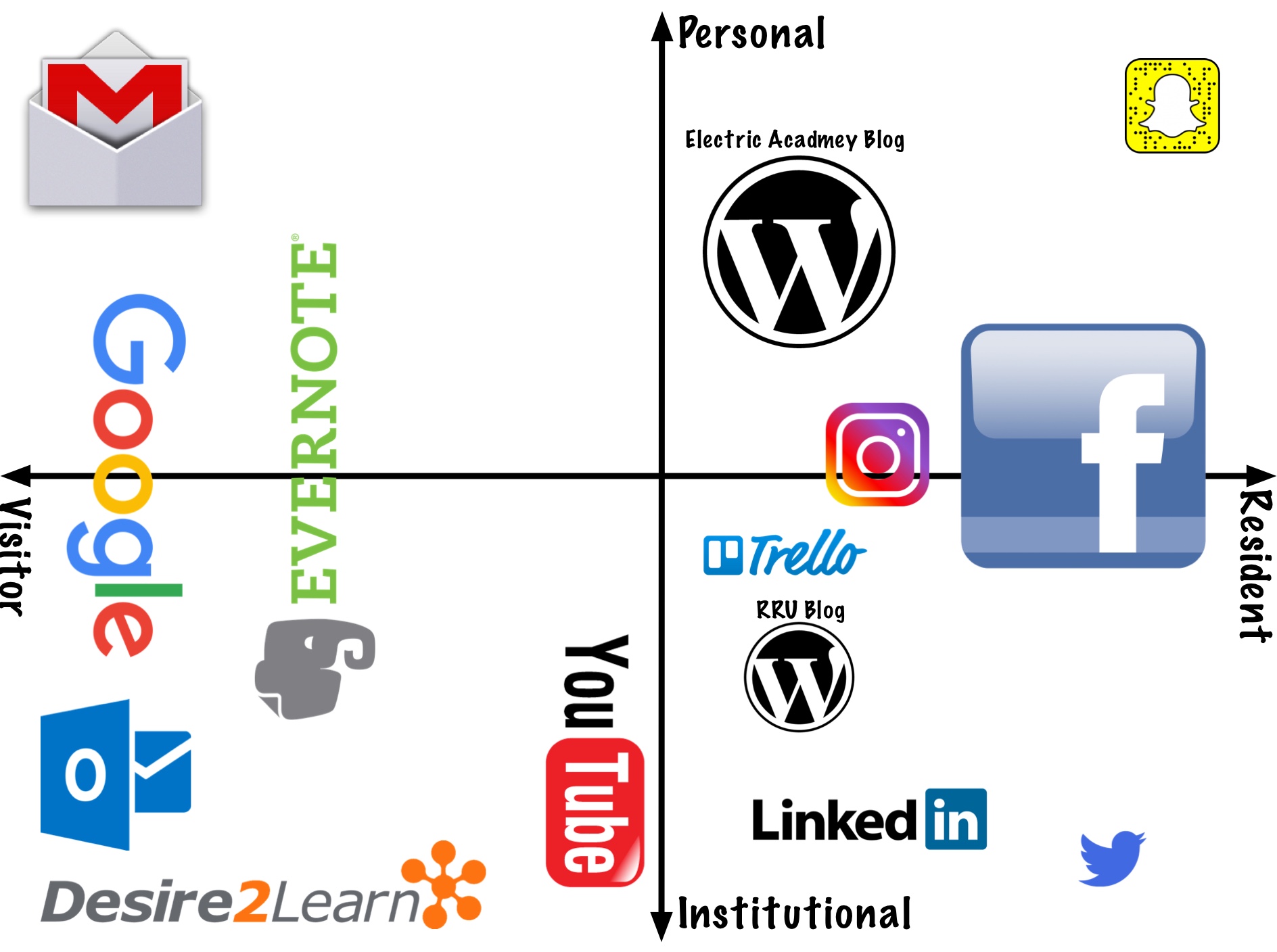
In order to break down my use, I took the digital technologies and categorized them into the visitor or resident framework. Then as I started placing the icons on my map I started shifting them in regards to the personal versus institutional.
Visitor Tools
- Gmail: I use this for my personal email. It is not something that I use to carry on conversations but rather a place that I receive newsletters, send information, and keep my contact information
- Outlook: This is my work email platform. Much like my personal I use it for quick correspondence, keeping track of contacts, and the calendar.
- Google: Like most people who use the interwebs, I use google for all of my internet searching.
- Evernote: I am a huge fan of Evernote. I use it as my cloud-based filing system. I use it for both personal and professional information.
- Desire 2 Learn: This is the LMS that BCIT uses. All of my class notes, worksheets, and resources are kept here for the students.
- Youtube: I create tutorial videos for my students. I use Youtube to host those videos. The videos do get comments that I respond to which is why it is shifting closer to the resident side of the grid.
Resident Tools
- WordPress: I keep a blog for electricians and electrical apprentices. This is more of a personal passion project where I give lessons, advice and share my videos. I also keep a blog for the MALAT program. This is why the WordPress icon shows up twice.
- Trello: This is the web-based software that I use for project management. I use it to keep track of jobs I have, videos I am building, and personal goals.
- Instagram: I use Instagram mostly for personal use. I also use it to promote programs and courses I am involved in at work.
- Snapchat: This is my guilty pleasure social media app. I use it to follow friends, post pictures, and chat.
- Linked In: This is a platform I use for educational purposes and to network with others in my field.
- Facebook: Facebook is where most of my social media interaction occurs both personally and professionally.
- Twitter: I use twitter to network with others in my field.
As platforms change, I can see this becoming more of a dynamic exercise. As my methods change and different platforms come and go so too will this map change and evolve. This exercise helped me think about how I used my digital identity. It helped me see where I am being intentional and other areas where I am living in a reactionary mode.
Not every tool is useful and perhaps after some time reflecting on the map, I could find some room for improvement.


April 26, 2018 at 6:24 pm
Great map Chad! I too was reflecting on how each tool ended up where it did on my map and whether that was intentional or not. In many ways I feel as though the placement of the tool on my map was relatively deliberate, but the amount of space it consumes was more natural.
April 29, 2018 at 12:35 pm
Your map is so visually appealing, Chad! I want to comment on Jessica’s comment about the placement of our digital map being deliberate and the space it consumes is more natural. This was exactly what I was feeling when creating my map. It was difficult to place some platforms in one static place as it had many roles in my life. I wanted to have lots of arrows or circles to show movement. Did you feel that with any, Chad?
April 30, 2018 at 5:13 am
Thanks Danielle. I 100% felt that way. I feel as though the icons on my map are constantly moving back and forth, up and down. What may be in the visitor area in one moment may find itself in the resident area the next. I spent a long time moving things around as I built this. I finally settled on where it spends most of its time.
April 27, 2018 at 8:52 pm
This looks great. I really like that you used the logos and sized them accordingly. I found it interesting that you put D2L on the visitor side. I actually put it almost exactly on the opposite side because of the footprint of including all of the things for learners and in the end, grades with comments.
This made me look at that and wonder if it’s really leaving something there as a resident knowing that everything is relatively temporary and will be gone as each term rolls over.
April 30, 2018 at 8:16 am
As far as D2L is concerned, right now it sits on my visitor side. I post all my students worksheets and some resource videos to it and then I basically leave it alone. It ends up being more of a tool for my students than a tool for me. That being said this is a definite gap area for me and something that I hope to work on in the future.
April 30, 2018 at 6:55 am
Working also at BCIT (:-)), I am surprised that you placed D2L on the visitor side. Using it as an LMS for the class (sharing materials, creating quizzes… sharing info and grades) would not push it into the resident section?
April 30, 2018 at 6:58 am
I second Jeff’s note that the size of the logos are clearly indicating your usage and feelings. Working also at BCIT (:-)), I am surprised that you placed D2L on the visitor side. Using it as an LMS for the class (sharing materials, creating quizzes… sharing info and grades) would not push it into the resident section?