

Description
The purpose of the digital learning tool (DLR) is to assist students, age between 23-40, with a few years of work experience, in transition to the web development (WD) field, reaching the end of their Web Development Certificate program (WDCP), with organized information and resources to guide the planning and development process of their professional portfolio site geared toward their after-program goals, to allow them to consume the info at their own pace, anywhere and anytime, keep them on track and engaged but not overwhelmed, in an environment that they will use in their professional life. The Portfolio Website module (PWM) is a ten-day classroom course, over the last seven-eight weeks of the WDCP, and in parallel, the learners work on their Capstone Project module (CPM). The DLR will focus on the “why” and the “how” the learner will and can benefit from having a well-planned and professionally developed portfolio website.
Learning Goals
In the PWM, the students are to plan, design, develop and publish a professional-level portfolio website, to showcase all their digital work in a fully functioning publicly accessible site. This portfolio is vital in a quest for web development (WD) related positions. With the successful completion of the module project, the learners will have a portfolio website using HTML5, CSS, JavaScript, React.js, optionally PHP and/or a content management system such as WordPress.
The students will be able to:
Plan the content and information architecture of a professional personal portfolio site based on after-program career goals.
Design, develop and publish a publicly accessible professional-level portfolio website.
Choose and purchase a professional custom domain and appropriate hosting package to publish a secure portfolio site on a public webserver.
Intended Audience
The WDCP students are adult learners, their ages range from 18 to 50, mostly between 23-40 with the occasional right-out of high school participants or more mature students. Most of the learners are in career transition with a few years of work experience, with different educational and cultural background, gaining competitive foundational knowledge to get an entry-level job in their new field.
Rationale
A 23-week full-time fast track WDCP provides opportunities for people to redefine and reskill themselves by focusing on the core field-specific competencies, the various coding languages and employing project-based learning to engage students’ in real-world cases. The Portfolio Website module (PWM) is a ten-day classroom-based course, over the last seven-eight weeks of the WDCP, and in parallel, the learners work on their Capstone Project module (CPM). In the PWM, the students are to plan, design, develop and publish a professional-level portfolio website, to showcase all their digital work to support their application for web development (WD) related positions. An early module covers the planning stage of the WD process and teaches the students that if they “don’t know why and who before they come up with what, they will end up creating nothing for no one” (Hess, 2012). However, based on survey feedback and observations the learners are more passionate about learning to code at that stage than considering the audience, content plan, or information architecture of a website (BCIT School of Computing and Academic Studies, 2018). Until recently, I facilitated both the PWM and the CPM modules; thus, I had the opportunity to meet the students almost every day, handling the two modules days flexibly. The situation changed due to my other professional engagements; therefore, I am not able to follow the learners’ daily progress and keep up their engagement in person. I guide the students and provide them with feedback in between the course days on different digital platforms. The recently graduated class was the first occasion when I facilitated the PWM in this hybrid format and based on this experience, the model needs improvement and adjustment to ensure the students meet the set learning goals.
Tools
Bates (2015) states that the use of technology in teaching is a means, not an end. However, in this situation, it is both. I am planning to use Slack collaboration and communication tool with several channels and integrate a few third-party apps/tools into it. Using Slack collaboration and communication tool is not only a convenient way to collaborate (even 24/7 on any devices) but based on my discussions with numerous Greater Vancouver web developer agencies Slack is the preferred communication method in the WD field, also at numerous large corporations (Woyke, 2018). Bates (2015) mentions that students should be studying within 20 minutes of logging into a technology, suggesting that spending significant time on how to navigate within the environment is not acceptable. By choosing a method known to all learners, it is estimated that very little will be required to orient students to this tool. The survey and the in-person session in the empathy phase revealed the satisfaction with the use of Slack for the industry project, and both the learners and the instructors valued the quick, informal nature of it over emails and the seamless integration of the industry-specific tools.
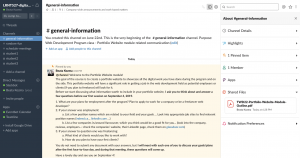
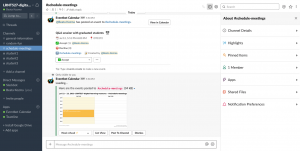
The plan is to use the DLR to:
- Keep in contact with the learners in between the face-to-face days, provide a platform to submit their plans for formative feedback or vent ideas, ask questions in private or openly within the cohort.
- Keep the learners on track by showing the detailed calendar/schedule and send (potentially automated) reminders for the upcoming in-person or individual activities.
- Share resources relating to web design and development content, ideas, a career in WD field etc. (articles, resource links, Lynda.comvideo links, suggestions, short video clips from industry).
- Have a platform where they can interact (vote, poll, chat, share fun…)
- Provide a space to chat with each other without the instructor’s supervision.
The following third-party apps/tools will be integrated into Slack:
- Google Calendar or Eventbot: for schedule and reminders (Note: importing existing calendar from Outlook, Google, Trello or else works only with paid Slack plans, otherwise the events and tasks need to be created inside Slack, which is cumbersome in case of alarge number… As a start, it might need to be manual until the program updates for a paid plan.)
- Teamline: task management (Note: can work well with the free plan to assign tasks to students or teams, in lieu of the imported calendar which is only in the paid Slack plans.)
- Google Drive to share and collaborate on content related files
- Trello for project management (Note: although it is an individual project, but requiring the students to create a project timeline, forces better planning, and taking responsibility.)
- InVision and Adobe XD for sharing wireframes and website prototypes (Note: students can showcase their skills and testing by using prototyping tools for the planned architecture and navigation of the website.)
- Github for code collaboration and version control (Note: although it is an individual project, but professionally showcasing code in the web development field brings in the tool.)
- Poll app or vote with emojis (Note: The tested poll apps are a bit convoluted and slow. Voting and interacting with emojis “social media style” instead can increase social agency.)
- Giphy to share fun gifs (Note: Expressing feelings and fun interacting with gifs “social media style” can lighten the strict timeline of the project.)
- Slack Foundry – Slack training app (Note: To ensure the students have a quick way to pick up tips about Slack.)
Assessment/Evaluation Plan
The goal is to provide the learners well organized, timely, not overwhelming assistance to plan and develop the portfolio site to apply for field-related employment. Success will be determined by the degree to which the created portfolio websites fulfill the learner’s described and discussed career goals in the WD field.
There will be two or three 1-on-1 meetings to assist the students in the planning stage of the website to provide guiding formative feedback. The summative feedback for the students will have two components. The first component of the mark is about the content and the information & the architecture of the website to fulfill career goals and to showcase and emphasize the appropriate information. The second component of the mark will be about the design & development of the website according to best practices and standards.
I will be able to test and see the first results in using the DLR at the end of October with the upcoming class. Then the students’ feedback, industry feedback, and my observations will provide to improve and adjust the DLR where needed.
Learning Theories & Instructional Design Principles Used – Random Thoughts
Based on the student demographics, the adult learning theory will guide the creation of the DLR. Malcolm Knowles proposed the concept of facilitated learning first in 1968 when he differentiated it from directed learning as “the art and science of helping adults learn” (p. 351). Adult learning theories help to step into the shoes of adult learners and understand how their minds work. Knowles (1984) made a few assumptions regarding adult learners: adults are more self-directed, adults are coming from a place of experience, adults are more willing to learn once relevance has been determined, adults learn better by “doing”, adults are more intrinsically motivated to learn. According to Merriam (2014), there is no one adult learning theory. Several prevailing theories explain from different perspectives how adults learn, such theories are andragogy, self-directed learning, experiential learning, transformational learning. Many other theories exist; however, as Merriam (2014) described, all of them have one primary goal to help to create effective learning experiences for adult learners.
The main goal of instructional design in multimedia learning is to reduce the unnecessary cognitive load (the total load placed on working memory by instructional information) and maximize the cognitive capacity to help the learners to reach the learning outcomes (Kruger & Doherty, 2016). The DLR solution must be focused and to the point and contain only the necessary elements to balance the cognitive load and avoid hurting learning (Clark & Mayer, 2011) as the working memory can only process a set amount of information at a time (Sweller, van Merriënboer, & Paas, 2019). Teaching and media selection is vital, and Bates (2015) covers a lot relating to the design of media. The focus will be on keeping the DLR simple. I plan to integrate some of Mayer’s principles based on the cognitive theory of multimedia learning, as described by Bates (2015) such as coherence (remove distracting, irrelevant material), signalling, redundancy avoidance, segmenting, multimedia, modality, personalization, pre-training, image and voice to ensure the cognitive load on the learners are balanced (cognitive load theory). Halpern et al. (Halpern, Graesser, & Hakel, 2007) adds dual-code effect (using both verbal and pictorial), using stories and example cases to capture attention and engage, feedback effect (the benefit of personalized and timely feedback), applying desirable difficulties, considering discovery learning (guide and scaffold to help discovering principles).
Keller’s four-stage ARCS pedagogical model of motivation can be adapted to the structure of the DLR to encourage and sustain learners’ motivation throughout the learning process (Thomas, 2010). Keller asserts that by arousing interest (attention), creating relevance, developing expectancy of success (confidence), and producing satisfaction, the conditions for motivation can be created (Thomas, 2010). In the attention stage, a variety of methods can be employed to grab and hold the learners’ attention. Through different media such as in-person activities, Q&A sessions, articles, short video clips, and tutorials, the learners will be interested in exploring relevant materials. Feedback will be provided in the face-to-face sessions to engage learner confidence, further supplemented by the final presentation (and hopefully the trial by fire when they apply for jobs) to gain satisfaction by applying “what they learn in real-life situations” (Ally, 2008, p. 29).
Instructions for Use
By choosing a method known to all potential participants, it is estimated that very little will be required to orient students to this tool. The module outline and the first in-person day of the module will provide the rest of the instructions.
Plan for Use
I will not be offering this DLR as an open educational resource at this time. I plan to test the DLR with the upcoming cohort, and see what works, and what needs additional adjustments, how much work is to maintain it, and what is the quality of the student contribution.
The illustrations are created by the author.
References
Ally, M. (2008). Foundations of educational theory for online learning. In T. Anderson (Ed.), The theory and practice of online learning (1st ed., pp. 15–44). Retrieved from http://aupress.ca/books/120146/ebook/01_Anderson_2008-Theory_and_Practice_of_Online_Learning.pdf
BCIT School of Computing and Academic Studies (2018). Program review – Alumni and student survey results. Internal BCIT report: unpublished.
Bates, T. (2015). Teaching in a digital age. Retrieved from https://opentextbc.ca/teachinginadigitalage/
Clark, R. C., & Mayer, R. E. (2011). E-learning and the science of instruction: Proven guidelines for consumers and designers of multimedia learning (3rd ed.). San Francisco: Pfeiffer.
Halpern, D. F., Graesser, A., & Hakel, M. (2007). 25 learning principles to guide pedagogy and the design of learning environments applying the science of learning: What we know about learning and how we can improve the teaching-learning interaction. Retrieved from http://psyc.memphis.edu/learning
Hess, W. [whitneyhess], (2012, February 1). If you don’t know why and who before you came up with what, you will end up creating nothing for no one [Tweet]. Retrieved from https://twitter.com/whitneyhess/status/164745904618864640
Knowles, M. S. (1968). Andragogy, not pedagogy. Adult Leadership, 16, 350-352, 386.
Knowles, M. S. et al (1984) Andragogy in Action. Applying modern principles of adult education, San Francisco: Jossey Bass.
Kruger, J.-L., & Doherty, S. (2016). Measuring cognitive load in the presence of educational video: Towards a multimodal methodology. In Australasian Journal of Educational Technology. Retrieved from https://repository.nwu.ac.za/bitstream/handle/10394/24668/2016Measuring_cognitive.pdf?sequence=1
Merriam, S., & Bierema, L. (2014). Adult learning: Linking theory and practice (First edition). San Francisco, CA: Jossey-Bass, a Wiley brand.
Sweller, J., van Merriënboer, J. J. G., & Paas, F. (2019). Cognitive architecture and instructional design: 20 years later. Educational Psychology Review, 1–32. https://doi.org/10.1007/s10648-019-09465-5
Thomas, P. Y. (2010). Learning and instructional systems design (University of Botswana). Retrieved from http://uir.unisa.ac.za/bitstream/handle/10500/4245/04Chap 3_Learning and instructional systems design.pdf
Woyke, E. (2018). Slack hopes its AI will keep you from hating Slack. Technology Review, 121(2), 12–14. Retrieved from https://search-proquest-com.ezproxy.royalroads.ca/docview/2023697381/fulltext/2FD1BA6BDBDB4508PQ/1?accountid=8056