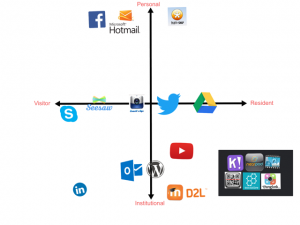
After I watched the video and read the article on resident visitor typology I started to think about my online presence and how I interact with others online. I found that most of my profession and personal interactions were very separated, although I had some online platforms that I use that bridged both my personal and professional life.
I tend to use Google Drive as a collaboration tool in my classroom and find it very effective and easy to use, which is why I probably use it as well as a tool to connect with parents on the teams that I coach for my kids hockey and baseball. There are a couple pieces of software that I find I use quite often in both my professional and personal life, and that is ‘seesaw’ and ‘coaches eye’. I use seesaw in class as a way for students to share their ideas and collaborate on projects, but my daughters 2nd grade class also uses it to connect with parents to show the days accomplishments, it is very effective in both regards. Another tool I use in my carpentry class is coaches eye, a video app that allows you to slow down video’s and annotate them using voice-overs and drawing tools. I use it to take videos of students using tools and then to share them with the class and note proper and safe techniques of tool use. I also use this quite often in hockey and baseball as a coach as it allows me to slow down video and pinpoint and isolate various techniques in our players. The kids really like to see their actions in slo-mo and it is a very effective way to show them what things they need to work on.
On thing you may notice is the cluster of tools in the bottom right of my graph, these represent teaching tools that I have been using over the past few years that I have integrated into my classroom. This is not all of the tools that I have tried to integrate, but these are some that I use consistently.
The image below isn’t great quality, click on the link below it for a sharper pdf image.
Hi Steve –
It’s interesting how one online entity can be used in so many different ways, isn’t it? I had a hard time with that as well, and ended up using duplicates as the simplest way to organize my thoughts.
I’ve never heard of ‘coaches eye’ before, and it’s something I’m going to look into.
Coaches eye is great, but you have to pay for it, there is a free app that pretty much does the same thing called Hudl Technique (https://www.hudl.com/products/technique)
Hi Steve,
I see that, like myself, a lot of the cloud software from the professional realm spills over into the personal one. I see this as a sign of a great tool, when you an utilize it in many situations. I have never heard of “seesaw” or “coaches’s eye” before, I will have to check them out!
Hi Candace,
I agree, a tool that you can use pers on ally and professionally is very convenient. Seesaw is a great collaboration app, it is very easy for both the user and the instructor.
Hi Steve,
I recently started using Google Drive to share documents with my students and I find it very usefull but I have never used “Seesaw”. I will definitely look it up to see if I also can utilize it.
Thanks for sharing!
May
Seesaw seems extremely user friendly on the consumer side, it is also pretty easy to use to produce content.
I think one of my favorite parts of reading these maps is learning about new tools. I live in the training and development world where you only get a short time to connect with your audience, with very few courses running longer than 8 hours. It’s challenging to figure out how I will integrate some of these tools, as they seem more suitable for long term interactions. Food for my brain to chew on!
Hi Adam,
8 hours of training is a different kettle of fish then teaching a whole semester for sure. Have you tried Kahoot? It’s a gamified type of quizzing tool that gets the audience in a competitive mode. i don’t use it for assessing things, but it livens up my class when things are getting stale for sure.