Category Archives: LRNT 521

Interactive Image Site

Hey,

I just came across a site that allows you to build interactive images and such similar to thinglink, but this one allows you some more options in terms of how the interactions appear.  Genial.ly is free and I didn’t find it too difficult to use on my first try.

I could see it being a great tool for building presentations (student or teacher) and creating engaging info-graphics.

Click Here to view a quick one I built using some stock templates…


Activity 1 | Discussing Impacts of Digital Learning

Our team (Bobbi, Karen, Krista and Myself) decided to look into how digital learning has impacted Racism in our society.  We decided to present our topic in the form of an interactive image using thinglink (www.thinglink.com).  We have 4 subcategories and several points for each category, just hover over the image to see the bullets appear to read each point.  The references are in the bottom left corner (yellow bullets).

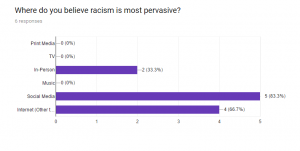
Also, their is a poll included that we would like you to take to get a sense of where you think racism is most pervasive in today’s society.

We will post the poll results later on in the week.

enjoy!

https://www.thinglink.com/scene/926660194618834945


AR vs. VR

Image Source: Pixabay CC0 Public Domain

I recently read an article that got me thinking (again) of utilizing Augmented Reality (AR) and Virtual Reality (VR) into my classroom  (http://www.emergingedtech.com/2017/05/how-to-use-augmented-reality-in-education-plus-5-apps/).  In the past year at work I have done some research into costs associated with AR and VR, and as more players enter the game, the prices have come down significantly.  There are even free apps available so your students can use their smartphones to build VR and AR realities that are fairly simple to use.  For example, students in my Carpentry shop class can use ‘Google Cardboard’ and create a 360 degree VR environment of the carpentry shop, then label the tools in this 360 view.  This content can be viewed with a VR headset, a smartphone, a tablet, and a desktop.  I have played around with it a little bit, it actually is created fairly easily.  Here is an example of creating a 360 degree space created using Holobuilder, not google Cardboard (https://holobuilder.com/app/index.html?e=0&scene=140872536477912&p=6265828108402688#player/6265828108402688?options=273&scene=140872536477912) .

It seems that everyone is now pushing AR as the next best thing, and apps such as Aurasma (https://studio.aurasma.com/landing) are leading the way and making it very accessible…it’s worth checking this site out, they are doing some pretty cool stuff.

I think that as more places integrate VR and AR into their teaching and learning, areas that were previously thought of as unteachable in an online environment will be able to be taught effectively at a distance.

Report on the changing landscape of online education (CHLOE)

Hi All,

Came across an interesting and timely report on the changing landscape of online education from Quality Matters (c) .

If you’re interested just fill in the info on the right hand side and it is a free upload.

https://www.qualitymatters.org/research/first-CHLOE-report-download?utm_source=Quality+Matters+Digital+Communications&utm_campaign=9422922827-CHLOE_report_1_2017_05_22&utm_medium=email&utm_term=0_355a0627da-9422922827-34019485&goal=0_355a0627da-9422922827-34019485

My Networks.

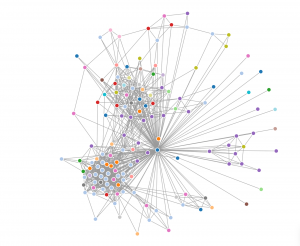
I decided to separate and investigate my networks into 2 different areas.  I looked at LinkedIn as a professional network (using Socilab software to create my map) and decided to also look at Twitter (using Netlytic software to create my map), not at my connections directly, but to investigate the #edtech that I follow and to see who was networking using this hashtag.

LinkedIn

For my LinkedIn map of my professional connections (I’m the blue dot in the middle where all the lines go to) I subdivided them into industry connections to see how varied my network is based on peoples employment.  After looking it over it was pretty clear that I network the most with people in the education industry (light blue) and construction industry (purple).  This makes perfect sense as these are the two biggest professional areas of my life past and present.

Twitter

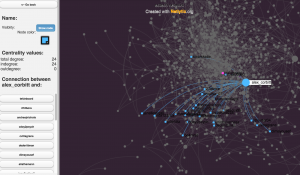
As mentioned above, I decided to follow the twitter hashtag edtech and see how many people were connecting using it.  I really liked the Netlytic maps as the nodes got bigger as that person got more traffic, and although the overall map looked like a jumbled mess when you clicked on a node it isolated their direct connections and provided a list of users on the left hand side.  I used a name network which tells us who mentions whom, rather than a  chain network that shows who replies to whom, I thought this would give a better picture of who is in this network.

As you can see in the image above someone named alex_corbitt had 24 connections in this map.

I can imagine that this would be a very powerful research tool if used to find out what particular people are networking and what topics they are connecting about.


A long road ahead to build my community…

As I will be away in Toronto this weekend with my family to watch the Blue Jays lose, I have been busy reading over the past couple of days to try and get ahead.  This weeks readings confirmed two things; Firstly, I am in the right Masters program because I am really enjoying the readings and finding them very informative; secondly, that the online course that I currently teach is lightyears away from where it should be to engage and inform my students .

George Veletsianos’ chapter on digital learning environments gave me pause to think about how to improve my own online learning environment, but there is sooooooo much to consider when designing (or redesigning) a course.  Bansford, Brown, and Cocking (1999) provide a nice summary and a good guide by suggesting that the environment be learner, knowledge, assessment, and community centred (as cited in Veletsianos, 2016, p. 245).  But then Veletsianos (2011)  had to suggest that we should provide learners an opportunity to engage with transformative learning experiences by incorporating intrigue, challenge, reflection, and engagement outside of the course into the design (as cited in Veletsianos, 2016, p. 247).  Not enough to consider?  Wilson and Parrish (2011, 10) also would like you to incorporate design fundamentals, challenge the learners by crafting the learning experience to include interactive media, and make sure that your design inspires learning (as cited in Veletsianos, 2016, p. 248).  This task seem’s almost too overwhelming, it’s no wonder that many faculty cringe at the thought of redesigning their courses.

After reflecting on these readings, I realize I really need to work on incorporating all this great knowledge into my own online course as we go through LRNT 521, otherwise I fear it will just be another thing on my ‘to do’ list for the future that will never be accomplished.  I think I will start with little changes that make sense to my course design and that encourage the building of community, such as allowing my learners to co-develop their assignments and assessments to give them more ownership of their learning (vanOostveen, R., DiGiuseppe, M., Barber, W., Blayone, T., & Childs, E., 2016, p.9).

I also realize that I need to just go for it (as Angie’s suggested in the ‘Ask the Instructor Forum’) and I will try to be conscious of this as I work on my digital plan and identity.  As a person that crave’s structure however, I really enjoyed Helen Beetham’s (2015, n.p.) blog post regarding the 6 elements for digital capability, and just for fun (insert sarcastic comment here) I decided to rate myself against the teacher profile…I think I will do this again in a few months and see what has changed.

https://docs.google.com/spreadsheets/d/1uccVnWKryG9ErzB2Vy_jl8aLIlhZSK63_LWbH3xxBC4/pubhtml

Ok enough serious conversation.  I am going to try and interject some fun here with a Quizlet.  If you haven’t used them before they are very easy to build and are a pretty good self assessment tool for your students.  Try and beat my time of 19.2 seconds! (Drag the correct answer over the question to make them disappear)

https://quizlet.com/141556404/match


PS…If anyone knows how to properly embed HTML into the wordpress blog I would greatly appreciate some help…I can embed the code and it looks like it works, but when I save the post it disappears…

References

Beetham, H. (2015, Nov 10). Building capability for new digital leadership, pedagogy and efficiency [blog post].

vanOostveen, R., DiGiuseppe, M., Barber, W., Blayone, T., & Childs, E. (2016). New conceptions for digital technology sandboxes: Developing a Fully Online Learning Communities (FOLC) model. In Proceedings of EdMedia: World Conference on Educational Media and Technology 2016 (pp. 665-673). Association for the Advancement of Computing in Education (AACE).

Veletsianos, G. (2016). Digital learning environments. In N. Rushby & D. Surry (Eds), Handbook of Learning Technologies (pp. 242-260). UK: John Wiley & Sons.
‘Blueprint’ for my Digital Identity

Image Source: Pixabay CC-0

 After the watching the virtual symposium presentations and reading all of the Unit 2 readings I have come to the conclusion that everyone in the world of ed tech is much smarter than me .  I was really impressed by the depth to which the presenters took their material and how passionate they were about their topics.  The readings made one thing very clear to me, I need to prepare my students for the real world and part of that preparation is to teach them to be professional, effective and responsible contributors to the online community.  As Ryberg and Georgsen (2010) point out, a big problem with ensuring that todays youth are digitally literate is that their instructors may not be, so I should be leading by example.  My overall goals are to build my web presence in a professional and meaningful manner, and to use that web presence to be an effective contributor to the educational community at large.

I plan to accomplish this by first off updating some of my dated social media sites, starting with LinkedIn and Twitter.  I also will further develop some web tools that are new to me, mainly focusing on my WordPress site.  Once these spaces are updated, I want to begin to contribute and share resources in a more effective way with the learning community both in the MALAT program and the online educational community.  I hope to do this by not only posting often to my own blog site and responding to others in a timely fashion, but ensuring the posts are meaningful and add to the conversation (not to just post for the sake of posting).

As I am fairly tech savvy and have a good knowledge many educational tools and software from my time as a faculty mobile coach, I don’t envision many issues with finding content to share.  My challenge will be first to apply solid pedagogy to those educational tools and to frame them in effective teaching practices, then to share these practices through my online identity.  In order to do this I will have to put more time into researching proper pedagogy in teaching and learning with tech.

My goal is to have my digital profile updated and to have researched and posted 5-8 solid posts on teaching and learning with tech to my blog (and Twitter).  I will consider myself successful if I can accomplish this by the end of LRNT 521.

 References

Ryberg. T., & Georgsen, M. (2010). Enabling digital literacy. Nordic Journal of Digital Literacy, 2(5).