I decided to separate and investigate my networks into 2 different areas. I looked at LinkedIn as a professional network (using Socilab software to create my map) and decided to also look at Twitter (using Netlytic software to create my map), not at my connections directly, but to investigate the #edtech that I follow and to see who was networking using this hashtag.
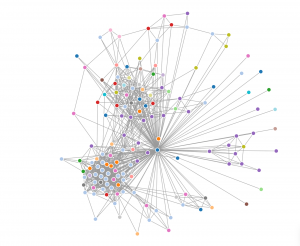
For my LinkedIn map of my professional connections (I’m the blue dot in the middle where all the lines go to) I subdivided them into industry connections to see how varied my network is based on peoples employment. After looking it over it was pretty clear that I network the most with people in the education industry (light blue) and construction industry (purple). This makes perfect sense as these are the two biggest professional areas of my life past and present.
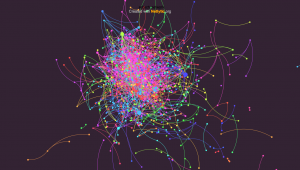
As mentioned above, I decided to follow the twitter hashtag edtech and see how many people were connecting using it. I really liked the Netlytic maps as the nodes got bigger as that person got more traffic, and although the overall map looked like a jumbled mess when you clicked on a node it isolated their direct connections and provided a list of users on the left hand side. I used a name network which tells us who mentions whom, rather than a chain network that shows who replies to whom, I thought this would give a better picture of who is in this network.
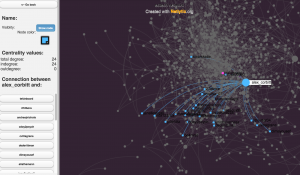 As you can see in the image above someone named alex_corbitt had 24 connections in this map.
I can imagine that this would be a very powerful research tool if used to find out what particular people are networking and what topics they are connecting about.
Hi Steve, the networks look really cool. My network won’t be as extensive, but I’m wondering what I’ll find when I plot mine. I see in your LinkedIn map along with your light blue hub (education) and your purple hub (construction), you have a third grouping that seems to be more varied in occupational category. If I had to guess, I would say those would be your social connections that you have connected professionally? Otherwise, I’m very curious about that grouping.
Hi George,
Yea the maps look pretty cool, interesting perspective on your network. You are absolutely correct, that varied cluster are my social connections that are also professional connections. Also I noticed that aside from about a dozen outlying singular connections most of the people in my network share some sort of connection. I’m not sure if that means I have a well rounded, connected network or that I need to branch out to those outside my connected network.
Hi Steve — love the reflection and the share out. Netlytics is an awesome site and love that you have focused on the hashtag of edtech… good to have a focus. How are you liking twitter? Are you contributing or tweeting in that domain? Are you also looking be a resident of that community? (Can I ask how you were able to get the twitter role on your sidebar? I have had little success).
And wait, you have your LinkedIn up and running already — geez. I am behind the ball. I promise– end of this course. Good for you.
Thanks Steve for the good ideas. I am looking forward to what you discover.
HI Bobbi.
My LinkedIn may be up and running, but it is very far from being set up, still lots to do. I am getting more used to using twitter and am still on the fence about my like or dislike for it. I do see it as an effective medium to share, although you have to wade through a lot of BS it seems…
To get the RRUMALAT twitter feed on my page I inserted the “shortcodes ultimate” widget (in the appearance section of your dashboard) and then went to the twitter widget creator webpage and got the code for it (https://twitter.com/settings/widgets/new), Once I had the code I pasted it into the Shortcodes Widget.
Let me know if it works for you
Steve, this may be a silly question, but how did you post the network visualization. I am finding the LinkedIn site a little tricky to capture the image and post to my blog, any advice?
I used a screen grab on my mac (Command+shift+4). I think you could also do a screen shot on a tablet, and I think newer PC’s have something called a “snipping tool” that you can use to take a screenshot…