Tag Archives: LRNT 521

Google “Hangout”

Hey Everyone,

I am trying to figure out how to use Google Hangouts, Angie has agreed to join me on a video chat either tomorrow or Friday.  Once we settle on a time I will post a link here and would welcome anyone to join to try it out and have a short chat.

Steve

“Offsite” Collaboration tool

Hi Everyone,

Looks like Google Docs is the winner for our “offsite” collaboration tool.  As I mentioned earlier, we can change this up at anytime if we feel the need.

MALAT 2017 Cohort _Offsite Collaboration_ – Google Forms

I have created a folder to share, please send me the email you would like to use (send to steve.minten@royalroads.ca) and I will set you up as an editor.  Also, if you know of a good Google add-on that will work to organize out conversations, please let me know and I will set it up.

Thanks

Steve

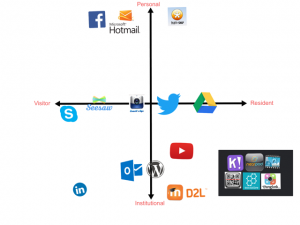
Resident Visitor Map

After I watched the video and read the article on resident visitor typology I started to think about my online presence and how I interact with others online.  I found that most of my profession and personal interactions were very separated, although I had some online platforms that I use that bridged both my personal and professional life.

I tend to use Google Drive as a collaboration tool in my classroom and find it very effective and easy to use, which is why I probably use it as well as a tool to connect with parents on the teams that I coach for my kids hockey and baseball.  There are a couple pieces of software that I find I use quite often in both my professional and personal life, and that is ‘seesaw’ and ‘coaches eye’.  I use seesaw in class as a way for students to share their ideas and collaborate on projects, but my daughters 2nd grade class also uses it to connect with parents to show the days accomplishments, it is very effective in both regards.  Another tool I use in my carpentry class is coaches eye, a video app that allows you to slow down video’s and annotate them using voice-overs and drawing tools.  I use it to take videos of students using tools and then to share them with the class and note proper and safe techniques of tool use.  I also use this quite often in hockey and baseball as a coach as it allows me to slow down video and pinpoint and isolate various techniques in our players.  The kids really like to see their actions in slo-mo and it is a very effective way to show them what things they need to work on.

On thing you may notice is the cluster of tools in the bottom right of my graph, these represent teaching tools that I have been using over the past few years that I have integrated into my classroom.  This is not all of the tools that I have tried to integrate, but these are some that I use consistently.


The image below isn’t great quality, click on the link below it for a sharper pdf image.


Residentvisitor


Cohort check in

Hi everyone,

Just checking in to see how everyone’s first couple of weeks have been?  I am a bit overwhelmed but am starting to get a handle on things

I would like to set up a place where we can connect easily outside of the “walls” of RRU to discuss any happenings in the course.  If you could use the survey below (I tried to embed, if that doesn’t work simply click on the link) to pick a platform that would suit you best sometime this weekend that would be great.

I will total the votes and send out something early next week.  This is only a starting point, as we move through the program together we may find another platform will suit us better and we can decide as a group to change at that time.

Also, please feel free to contact me anytime via email (steve.minten@royalroads.ca) if you wish to discuss anything related to the program privately.

Looking forward to learning together!

Steve

Loading…

https://docs.google.com/forms/d/e/1FAIpQLSeuLBoWKxNcw0DREpB2RGxbjQW7jZWJo-7NKpPQj8AVHVc-rg/viewform?usp=sf_link

Virtual Symposium Thoughts

Image source: Pixabay

Open What?

I thought I had a handle on this whole open education movement, but after this week I realize that what I thought I knew only scratched the surface of openness in education.  I am trying to wrap my head around what is open?  What open is?  And the many varying degrees of openness…we have Creative Commons, open content, open educational resources, open educational practices, open for, open to, open by…my brain is starting to hurt.  I see the value in investigating into levels of openness, but I don’t think that it needs to be so complicated.  Openness to me should be separated into just a couple of categories, content and practice.  The first category is either open content that is usable for the general public or not, and the second category is an open practice or pedagogical tool that is open to use or not.  I realize that things are not always so black and white and it might just be a pie in the sky dream, but it would be fantastic if a structure could be developed similar to a simplified creative commons licensing where one could know quickly and easily whether or not a particular practice or content is open to use.  

Stop Looking At Me!

Dave Cormier’s presentation on the ‘Values of Open’ (RRU Virtual Symposium, 2017) reminded me of an issue that has plagued me as a teacher over the years, how do I get the students to stop looking at me for answers and start looking to each other for learning support?  The idea of participatory culture in education is not new, but as Catherine Cronin noted in her presentation, advances in technology have given learners choice as to where to learn, when to learn, and how to learn.  Hargittai and Walejko (2008) note that it is much easier to share content over the web and there is a much greater possibility that your content will be viewed due to the fact that there are so many that can access it (p. 239).  They bring up a valuable point however, that some have the means to produce content, while others simply have the means to consume it.  This creates a divide as the socially and financially better off have the opportunity to set the agenda of what information is out there, while others without the means can only consume and don’t have as much of a voice (p. 252).  I believe this to be true in education, but also in society as a whole.

Jenkins (2009) brings up an important point regarding participatory culture, and that is we cannot assume that our youth are media literate and have the proper skills to actively be involved in participatory culture.  We as educators must take on the responsibility of properly training our learners so that they can be fully involved in participatory learning (pp. 15-16) and also so that we can properly prepare them for the workforce where these skills are critically needed.


References

Hargittai, E., & Walejko, G. (2008). The Participation Divide: Content creation and sharing in the digital age. Information, Community and Society, 11(2), 239-256.

Jenkins, H. (2009). Confronting the challenges of participatory culture: Media education for the 21st century. MIT Press.