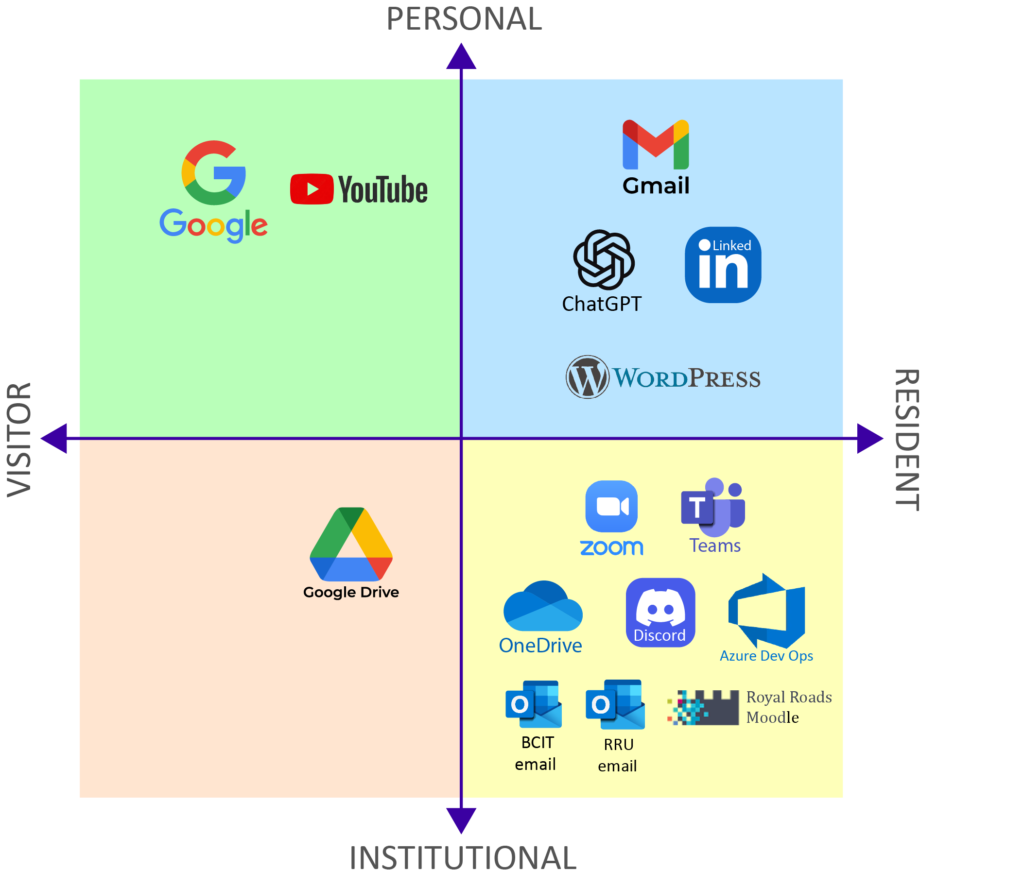
Creating this map using the resident–visitor typology (White & Le Cornu, 2011) pushed me to reflect on how I actually engage with digital tools, not just which ones I use.
On the visitor side, I use tools like Google and YouTube to go in, find what I need, and leave. In contrast, platforms where I maintain an identity and engage over time feel more like resident spaces, such as Gmail, LinkedIn, ChatGPT, and my WebSpace blog.
I was surprised at how much of a digital footprint I have in the institutional/resident quadrant. This reflects my role as both an instructor and a student. Tools like Teams, Zoom, Moodle, Azure DevOps, and Outlook are part of my daily workflow and involve ongoing interaction, so they sit more on the resident side.
I also noticed that some tools, like Google Drive and YouTube, shift depending on how I use them. This showed me that my digital engagement isn’t fixed, but changes with context.
Considering Dave Cormier’s (2018) alternative tension pair of analogue–digital and individual–collaborative adds a new perspective to my map. While the resident–visitor framework helped me understand how I engage with tools, this looks at how I interact and work within those spaces. For example, tools like Teams, Discord, and Zoom fall into the digital and collaborative quadrant, reinforcing how much of my work and learning is shaped by interaction with others. In contrast, activities like searching for information or drafting ideas tend to be more individual, even when they occur in digital environments. This perspective helped me see that my digital practices are not just about presence, but also about the balance between independent work and collaboration.
References
White, D. S., & Le Cornu, A. (2011). Visitors and residents: A new typology for online engagement. First Monday, 16(9). https://doi.org/10.5210/fm.v16i9.3171
Cormier, D. (2018, March 31). Digital practices mapping – Intro activity for digital literacies course. Dave’s Educational Blog. https://davecormier.com/edblog/2018/03/31/digital-practices-mapping-intro-activity-for-digital-literacies-course/
20 April 2026 at 4:58 pm
Hi Craig,
I think our maps are kind of similar. Actually, looking at our classmates maps too, I can see we all have many similarities in how we use these tools, and how our digital identity develops. Do you make use of any social media app as well? I ask because I noticed you haven’t included them, and I have some friends that have decided not to use any of the social media because they felf they were “not being themselves”, which reminded me of Rowland and Estevens’s (2024) research where they collected information on how people view their identity online. One of the participants said the same.
21 April 2026 at 5:08 pm
Thanks for your question Christiane.
Your point about Rowland and Estevens (2024) does resonate with me. Social media can feel performative, which is why I’ve kept those platforms out of my “resident” space.
I also find that maintaining a presence takes a lot of time. I do have a family Facebook account that my wife maintains well, and that satisfies my social presence needs.
It also made me think about Hargittai’s participation divide. I tend to consume more than create in public spaces, which is something I’ll need to work on.
21 April 2026 at 6:43 pm
It’s interesting to think about these spaces where some people consume while others perform. Like you, Craig, I tend to be a social media consumer more than a performer because I don’t really want my personal life to be on public display and, if I were to post more, then it would take me a lot of time and effort to produce content that I feel represents my life authentically.
It does make me wonder about the biases we see on these online platforms. If the lives and opinions of the people who consume were represented as much as the lives and opinions of the people who post, I wonder what effect that would have on the quality of the content available?
21 April 2026 at 6:56 pm
P.S: I’ve only scanned the article so far but Rheingold (2010) argues that social media literacies need to be included in both what we teach and how we teach. These literacies include “participation”, “network awareness”, and “critical consumption”. I believe Rheingold approaches this topic from a student engagement perspective–he posits that using digital networks to teach may boost engagement. However, if students are taught how to contribute well to social media, then it is bound to affect the quality of the available social media. Maybe the consumer would be more inclined to post and the performers would post better…?
27 April 2026 at 12:28 pm
Thanks Claire,
A lot of people sit more on the consumer side than the creator side. I think that creates bias in what we see. The loudest voices end up shaping the conversation, while a much larger group is reading and is not well represented. That can make certain opinions seem much more dominant than they actually are.
I like your point about teaching social media literacies as well. Students need to be able to question what they are seeing, not just accept it because it looks polished or confident.
If more people felt comfortable contributing without feeling like they had to “perform,” I think online spaces would feel a lot more genuine.