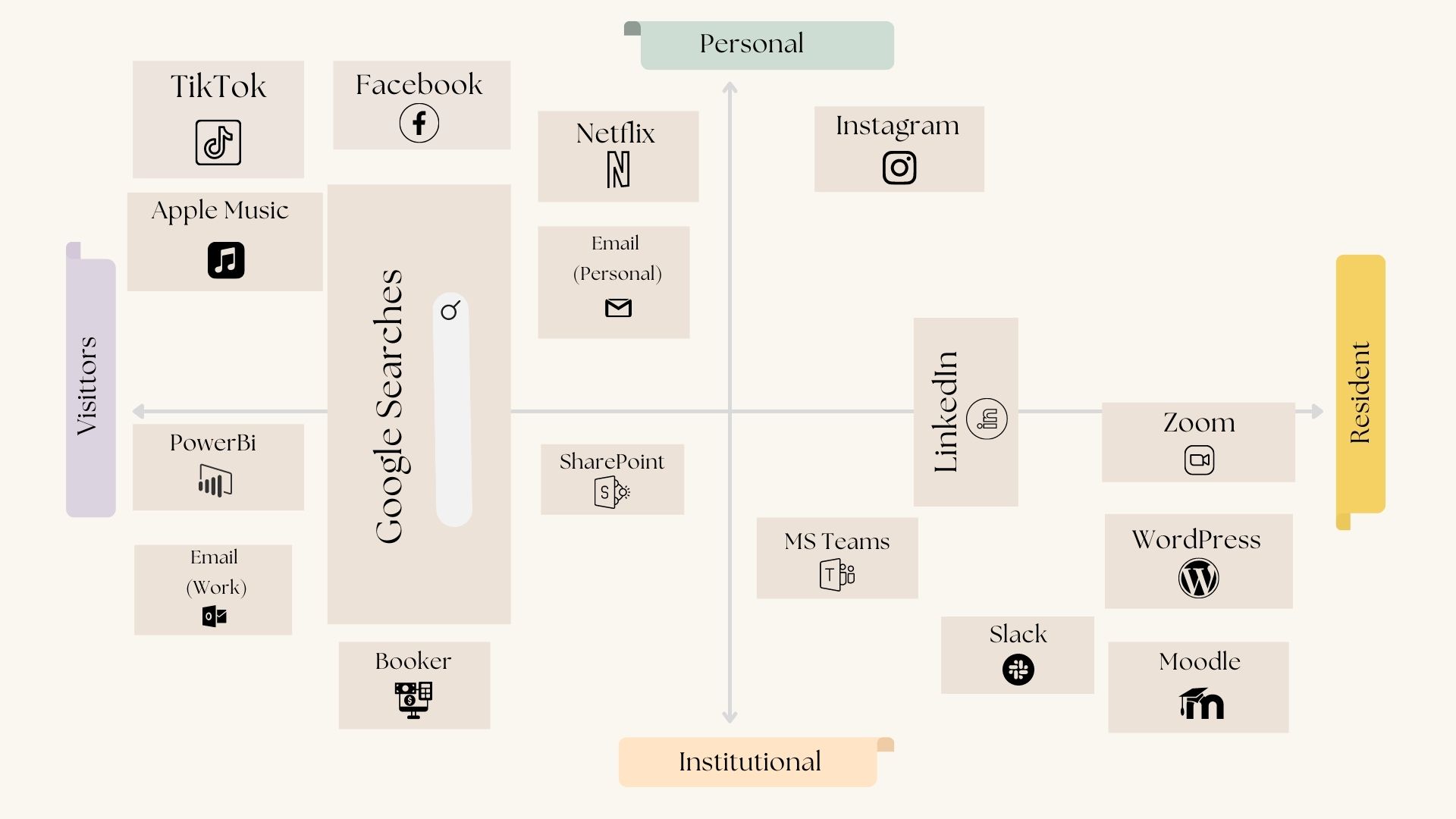
Initially, when I started to build my map of technology, I had originally thought my activities would have fallen more towards the personal-resident spectrum. As it turns out, most of my personal activities online fall in the visitor spectrum. Prior to the pandemic, when I wasn’t working from home, a lot of my technology use was more resident/personal; however, now that I’ve been working from home for two years and have to live, work, sleep, and now be a student all within the same walls, I’ve had to set strict boundaries with how much time I allow myself to use digital technology to avoid burnout. It will be fascinating to see how my technology map evolves over the coming years.
In the toggles below, you’ll find a breakdown of my technology usage, organized by where I fall on the spectrum.
Visitor/Personal
Facebook: I only have connections to my friends and family on Facebook. I generally use Facebook to look at things on Facebook Market Place (but never actually buy anything).
Tik Tok: I don’t follow any of my friends or family. I use this app to anonymously scroll and watch videos (admittedly, a lot of dog and cat videos – the algorithm knows me so well)
Netflix: I don’t think I need to explain this one!
Email (Personal): I use my personal email to interact with friends and family, as well as to spend countless hours unsubscribing from mailing lists.
Apple Music: This is the app that I use the most during the day. Music has a significant impact on my ability to concentrate.
Visitor/Personal and Institutional
Google Searches: Searching engine for both personal and institutional uses.
Visitor/Institutional
PowerBi: I utilize this tool to extract data from our Point-of-Sale System (Booker), which creates key performance indicator data that I use to assess various aspects of the company.
Email (Work): This email is just for work-related purposes.
Booker (POS): Booker is our Point-of-Sale system, which is essentially the software that is used to book and process all appointments for the companies.
SharePoint: I use it to look up company information and documents.
Resident/Personal
Instagram: My Instagram page is open to the public, and it has followers who are my friends, family, and complete strangers. I use Instagram for the social engagement element.
Resident/Institutional
WordPress Blog (RRU): Only used for the MALAT program to engage and contribute to the community via WordPress.
Slack: Strictly used to communicate with the members of this cohort.
Moodle: Moodle is only used to engage and collaborate amongst this cohort.
MS Teams: This is one of the most common business communication methods. This is usually where our team communicates with one another (a lot of times just sending each other GIFs)
Zoom: I mainly use Zoom for team meetings and/or class sessions for the MALAT program.
Resident/ Institutional and Personal
LinkedIn: I use LinkedIn to participate in many groups and discussions, as well as to create and share my own personal posts.
I loved this map. As a web nerd I liked your “accordion” widget that show/hide your information on the various quadrants.
Reading various maps from our cohort I like finding out about new digital networks and tools that I have never heard of, because I am not a part of certain industries or professions. A couple of your tools in your visitor/institutional I had never heard of. This makes me realize how vast the digital networks and tooling landscape is.
I agree with Michael, I love the way you did your map, and how you went about explaining it. It’s interesting to see how our digital map work and the way we use it or thought we did.
Hello Jess,
Like Michal and Michael, I think this map is well presented. The additional text helps analyze and interpret your technology use inventory. I see universal design elements for learning (UDL) in your blog. You provide individual choice to read more with the accordion tabs. The tabs also offer ways of customizing the display of information. See https://udlguidelines.cast.org/ for an introduction and graphic summary of the UDL framework for learning.
You describe your strict time boundaries for using digital technology to avoid burnout. How can we design with learner wellness in mind?
Hi Jess,
I really enjoyed reading your post on From Visitor to Resident and I can completely understand how it would be important for some us to “stay out of the spotlight”, as it were, if one is uncomfortable being “google-able” or being more of a resident in a digital space. Which brings me to my question: out of curiosity, what sparked your decision to pursue a master’s in learning and technology?
Cheers!
Hi Marion!
My apologies for not having the comments section for my original post! That is a very fair question to ask. As much as I do not want to be in the spotlight or leave a digital footprint … I LOVE tech – it’s always been something that I have enjoyed plus adding the learning component which is a new passion for me. I’m hoping that throughout this MALAT program I’ll be able to shift my perception a bit more in hopes to feel a bit more comfortable “exposing” myself a bit more on the web 🙂 I do see so much value in being more of a resident in terms of a professional career.
Thank you for reading my post 🙂