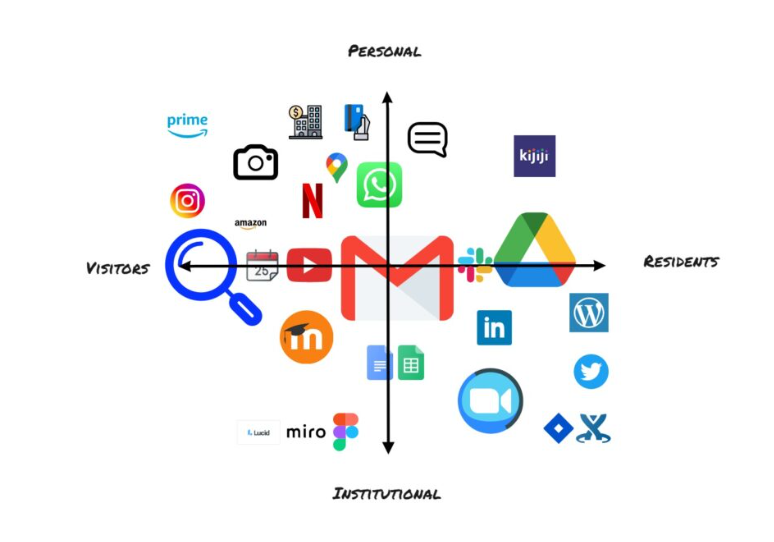
Having access to and ones familiarity with a particular set of tools is dictated by the type of work we do online, one important functionality for both personally and professionally is that the technology, platform or service has an Application Programming Interface (API); an API makes it possible for two apps to essentially “talk” to each other. It would be interesting to see the relationships between the apps themselves and take note of which one’s complement other apps and which ones are reliant on other apps for their own desired functionality. Perhaps a question for further down the road.
I will briefly discuss a few of my choices and feel free to view some additional mapping components I looked at in the link following this blog. Email for me is heavier in the institutional section, though I use email in practically all areas of my life, it is the pure quantity of email communication that gives it its position. In addition, email to me is fairly resident, it can be retrieved and it leaves both an impression and a fingerprint. Video conferencing is essential for my work. I have used it to connect to personal contacts in the past but nothing in comparison to how reliant I am on virtual meetings at work. Google Drive is how I store absolutely everything. I included other items such as online banking and investment apps, social media and Amazon however for the most part organizing these into a relational space was much more straightforward.
Because I had the opportunity to read Dave Cormier’s blog before, during and after doing the activity, I found myself considering Cormier’s model of what it means to look at ones whole “practice rather than the digital stuff” (Cormier, 2018) and this had me considering and eventually adding tools such as google maps, my camera and even amazon; which allowed me to really examine the tools in my day to day life.
Reference
Cormier, D. (2018, March 31). Digital Practices Mapping – Intro activity for digital literacies course. http://davecormier.com/edblog/2018/03/31/digital-practices-mapping-intro-activity-for-digital-literacies-course/
Click here to see my VR mapping journey. If you have difficulties accessing the links content, please let me know.
https://miro.com/app/embed/uXjVO630kII=/?pres=1&frameId=3458764523838223628
04/25/2022
Great post and map. I enjoyed your thought question about how these tools interact with each other and how that effects their functionality. Could you use Zoom without Gmail? Or how does Google Drive enhance the functionality of WordPress? How can we leverage our knowledge of these tools and how they interact with other tools to turn them into real power tools of digital learning.
Your post gave me so much to think about. Thank you for the insightful post on your digital map.
05/18/2022
Thanks, Michael, I appreciate you giving my blog a read, I really enjoyed the thought-provoking exercise and one thing I am experimenting with is using the free versions to see if I can create quality posts in the most basic tiered versions of different platforms and software. I am really attracted to the idea of minimizing barriers to access and want to experience what that actually looks like in practice. So far 2 months into the MALAT program I have needed to replace my laptop with one that can handle the increased demand, extensions, and apps.
04/25/2022
Hi Nicole,
Thanks for sharing your map. I appreciated your reflection and realize that I didn’t include tools you included, like the camera. This makes me consider how we define technology and where do we draw that line in our discussions and in activities like this. For example, I also didn’t include watching television or driving a car but one could make an argument for including these too.
Kristin