Before starting this week, I had a basic understanding of AR from using it with a preschool group; my knowledge of AR and VR tools has been further developed with the help of Team Yellow’s activities, where we explored different tools. Dick (2021) outlined many other ways that AR or VR can be used in a K-12 setting, and I enjoyed many of their ideas and saw the potential of using it cross-curricularly.
The most surprising thing I learned throughout the week was how far back this technology goes. Like much of what I learned in the MALAT program, ED Tech is not as new as some think. These tools have been around for a long time but are getting more advanced, so they are popping up more, especially in K12 education and students with learning disabilities (Dick, 2021). While they are becoming more popular, they still require a lot of outside technology, such as tablets, computers or headsets, which are resources that may only be available in some schools. Thus, while they are great ways to offer more immersive learning, not every student or school has the means to use these tools. Further, many of these applications are not free, another barrier for schools to use with students.
If the school had access to AR or VR resources, it would be an excellent way for educators to offer students a more interactive way to learn. From my experience using Quiver, I see a lot of potential, as this website and application provide various resources and activities that cover many school subjects. More examples of how I would use such tools would be to find ones that offer virtual field trips so students can explore history, art and other subjects in which they expand their worldview without needing to leave the classroom. These are just some initial ideas; as I mentioned in the discussion, I was intrigued by these tools and plan on further exploring them and finding free ones that can be used, as I believe they have many uses in the classroom.
Reference
Dick, E. (2021, August 30). The promise of immersive learning: Augmented and virtual reality’s potential in education. Itif.org. https://itif.org/publications/2021/08/30/promise-immersive-learning-augmented-and-virtual-reality-potential/
In preparation for Team Green’s facilitation week, Catherine and Marni met to brainstorm and plan an engaging learning experience for our participants. The unit content focuses on learning to use AI as a Digital Resource Assistant to determine best facilitation practices.
Learning Objective
Learners will be able to use AI to support facilitation strategies and enhance engagement and collaborative learning within the Community of Inquiry framework.
Timeline
Date
Mode
Facilitators
Learners
Sunday, October 6th 2024
Asynchronous
Introduce the module and resources.
Watch the introduction video and explore the resources.
Tuesday, October 8th 2024
Asynchronous
Create a Padlet for learners to share their thoughts.
Share which tool they have chosen and why. Reference readings.
Wednesday, October 9th 2024
Asynchronous
Respond to Padlet
Start creating a helpful resource for facilitation using the AI tool chosen using the CoI framework.
Thursday, October 10th 2024
Synchronous
Facilitate discussion for sharing the resource created by taking notes and asking questions.
Share the CoI strategy resource and one tip takeaway learned from the activity.
Friday, October 11th, 2024
Asynchronous
To summarize the learning based on previous Zoom meetings and post on Moodle.
Look over the summary and provide any additional comments.
Saturday, October 12th 2024
Asynchronous
Gather feedback
Provide feedback
Schedule for facilitation week
Learning Resources
Team Green plans to use the following resources to foster learning during the facilitation week:
Desjardins, D., Drought, B., Fischl, B., Frampton, S., Giannios, M., Jodrey, H., Korchinski, K., MacDowell, P., Moser, S., Moskalyk, K., Neibrandt, J., Neufeld, P., Peters, A., Otegbade, T., Schindelka, A., Tide, D., Tilford, L., Tooke, K., & Washlowsky, M. (2023). AI-Enhanced Instructional Design. University of Saskatchewan.https://openpress.usask.ca/etad873aienhancedinstructionaldesign
The following resources will be provided as optional supplemental resources:
Celik, I., Dindar, M., Muukkonen, H., & Järvelä, S. (2022). The promises and challenges of Artificial Intelligence for teachers: A systematic review of research. TechTrends,66, 616–630. https://doi.org/10.1007/s11528-022-00715-y
Mollick, E. R., & Mollick, L. (2023). Using AI to implement effective teaching strategies in classrooms: Five strategies, including prompts. The Wharton School Research Paper.http://dx.doi.org/10.2139/ssrn.4391243
Squalli Houssaini, M., Aboutajeddine, A., Toughrai, I., & Ibrahimi, A. (2024). Development of a design course for medical curriculum: Using design thinking as an instructional design method empowered by constructive alignment and generative AI. Thinking Skills and Creativity, 52. https://doi.org/10.1016/j.tsc.2024.101491
Asynchronous Activity
Before our synchronous session, we have some activities that will be done asynchronously.
Read and Watch: There are four readings on using AI tools as assistants; learners will choose two of the four they want to read. At the start of the module, learners will watch an introductory video.
Explore: Learners will explore the general education section of the AI toolkit and the tools outlined in that section. They can also explore different AI digital assistant tools they would like to use for the rest of the activities.
Discuss:Using Padlet, learners will discuss which AI tool they want to use and connect their responses to the readings. They will also respond to at least one other learner’s post.
Reflect: Using another Padlet, learners will share their initial ideas about the resource they want to create, their chosen strategy, and why.
Create: Using the AI tool they have chosen, learners will create a helpful facilitation resource based on their CoI infographic using one of their favourite strategies.
Synchronous Activity
Proposed date and time: Thursday, October 10th, 2024, 17:00 PST/ 20:00 EST
10 minutes
Introduce the session by presenting the module and using AI tools for facilitation.
10 minutes
Discuss the asynchronous activities (exploration, readings, and creation of their resource).
20-25 minutes
Share the resources they created using the AI tools and how they connect to the CoI framework, concluding with one tip/takeaway from the process.
5 minutes
We will conclude the session by summarizing the discussion and providing instructions for what comes next.
Learning Technologies
Moodle will be used as the Learning Management System (LMS) during the facilitation week. This platform allows hosting learning resources like readings and activities, such as sharing experiences using Padlet. Team Green chose this LMS and Padlet due to their ease and familiarity. The same familiarity applies to Zoom, which was selected to host the synchronous session. Team Green will continue to explore whether other learning technologies are required for the learning experience.
Learning Experience
The Community of Inquiry (CoI) framework has three presences that encompass the learning experience for students in online learning: Cognitive Presence, Social Presence, and Teaching Presence (Garrison et al., 1999). Team Green will facilitate these activities throughout the week using these presences as follows:
Presence
Activity
Indicators
Cognitive Presence
Learners will use Padlet to share their thoughts and comment on each other’s posts (Boettcher, n.d.).
Creating a helpful facilitation resource using one of their strategies.
Learners’ comments will be meaningful and thought-provoking.
Learners will share their initial ideas in another Padlet, making connections to their infographic.
Social Presence
Learners will share the resources they created in the Zoom session (Dunlap & Lowenthal, 2018).
Learners participate in the Zoom session and share their process and tip(s).
Teaching Presence
Provide clear expectations for activities and deadlines (Lalonde, 2020). Creating an interactive activity to start our synchronous session and spark discussion (Garrison et al., 2007).
Moodle metrics confirming logins and instructional video-watching
Learners are engaged with the activity and participate in discussion.
Dunlop, J. C., & Lowenthal, P. R. (2018). Online educators’ recommendations for teaching online: Crowdsourcing in action. Open Praxis, 10(1), 79-89. https://doi.org/10.5944/openpraxis.10.1.721
Garrison, D. R., Anderson, T., & Archer, W. (1999). Critical inquiry in a text-based environment: Computer conferencing in higher education. The Internet and Higher Education, 2(2), 87–105. https://doi.org/10.1016/S1096-7516(00)00016-6
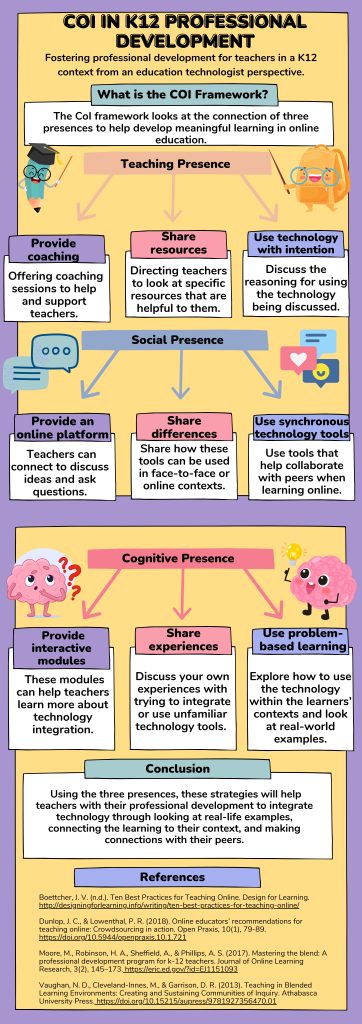
The CoI framework was developed to underscore the connection between three presences: teaching, social, and cognitive. Its primary goal is to cultivate ‘an engaged online learning community’ (Dunlap & Lowenthal, 2018, p.81). Using the Community of Inquiry (CoI) framework, this infographic will provide strategies to help K12 teachers integrate technology into the classroom from an education technologist’s perspective. As they are responsible for coaching teachers, the strategies are targeted to education technologists to help with teacher professional development (Reid, 2018).
Teaching Presence
Teachers can be unfamiliar with integrating new technology into the classroom (Moore et al., 2017), so providing them with coaching, whether in person, online through Zoom, or Microsoft Teams, is essential. Through coaching, it is crucial to guide the teachers using the technology tool and offer support when they need help. These coaching sessions can also be done individually or in groups. As teachers participate in these training sessions, it is imperative to share extra resources (Vaughan et al., 2013). These resources help bring more context to how these technologies can be used in their classrooms. While it is great to use technology in class, it is vital to use it intentionally (Dunlap & Lowenthal, 2018). There needs to be a reason for teachers using this technology (will it help students? Help with busy work?).
Social Presence
After coaching teachers, they may need extra help or want to discuss it with their colleagues. By providing an online platform, they can connect, ask questions, share ideas and examples of technology use, and more (Boettcher, n.d.). Further, teachers need to know how these technologies can be used either for online or face-to-face learning, so one strategy is to share the differences and provide examples of how they can be used for either context (Vaughan et al., 2013). Finally, when training online, use synchronous technology tools to help foster engagement and connections with the participating teachers. These tools can help break the ice and help learners become more comfortable contributing to the discussion.
Cognitive Presence
When training teachers, interactive learning modules should be included, as this can help them increase their technology skills, further develop their knowledge, and, therefore, be more likely to adapt classroom practice to incorporate what they have learned (Moore et al., 2017). In these learning modules and when providing coaching, create problem-based learning activities to allow teachers to connect to their classrooms and teaching styles and, therefore, have more context on how the technology can be used (Vaughan et al., 2013). Finally, it can be challenging to build relationships online, so be sure to share experiences with learners, as this can help them feel more comfortable sharing their own and thus learn more from each other (Vaughan et al., 2013).
These strategies help create a teacher community where teachers can learn from education technologists and each other to incorporate new technology meaningfully in the classroom, whether online or face-to-face.
Dunlap, J. C., & Lowenthal, P. R. (2018). Online educators’ recommendations for teaching online: Crowdsourcing in action. Open Praxis, 10(1), 79. https://doi.org/10.5944/openpraxis.10.1.721
Moore, M., Robinson, H. A., Sheffield, A., & Phillips, A. S. (2017). Mastering the blend: A professional development program for k-12 teachers. Journal of Online Learning Research, 3(2), 145–173. https://eric.ed.gov/?id=EJ1151093
Vaughan, N., Hrastinski, S., & D. Randy Garrison. (2013). Teaching in blended learning environments: Creating and sustaining communities of inquiry. https://doi.org/10.15215/aupress/9781927356470.01