While writing my introduction and thinking about my research question and sub-questions, I was interested in two main theoretical frameworks. Velestianos and Russell’s article (2013) highlighted social cognitive theory and cognitive load theory that I think would connect to my research question:
How might integrating pedagogical agents equipped with natural language processing capabilities enhance the effectiveness of language learning platforms for Canadian non-native speakers of English or French in virtual or remote learning?
Learning is inherently social; you have classmates and teachers, you can receive instant feedback and ask questions with quick replies, and most importantly (especially with language learning), you can have conversations. Thus, the social cognitive theory is the first framework I would like to investigate further regarding research using pedagogical agents for language learning.
Bandura initially developed the social cognitive theory, emphasising social interactions’ role in learning (Schunk & DiBenedetto, 2023). When using pedagogical agents, they can take on the role of teacher or peer and provide the social interaction needed in learning environments (Velersianos & Russell, 2013). Further, they can model, provide examples, and help when asked, taking on similar roles of human teachers or peers. As social interaction is critical in learning environments, whether in person or virtual, this is one framework I would like to use as I continue my research.
The cognitive load theory is the second framework I would like to use. This theory examines how using different technologies in tasks can impact one’s working memory (Veletsianos & Russell, 2013). When using this theory connected to my research questions, I want to see the impact that using pedagogical agents could have on students’ mental load when learning a new language. Would an animated agent be distracting? Does the design cause one to feel strange, like when thinking about the idea of an uncanny valley? The concern with using pedagogical agents in this framework is that the students focus on unnecessary stimuli that detract from their learning and follow more critical information.
These are just two theories I am considering. If any other theories may be better suited to my research and topic, I would love to hear more feedback!
References
Schunk, D. H., & DiBenedetto, M. K. (2023). Learning from a social cognitive theory perspective. International Encyclopedia of Education(Fourth Edition), 22–35. https://doi.org/10.1016/b978-0-12-818630-5.14004-7
Veletsianos, G., & Russell, G. S. (2013). Pedagogical agents. Handbook of Research on Educational Communications and Technology, 759–769. https://doi.org/10.1007/978-1-4614-3185-5_61
Since starting the MALAT program, I have been exposed to several ways to disseminate research. As we get closer to starting our research, I have begun to reflect on how I would like to share my upcoming Applied Research Project (ARP). While my ambition is to publish in a journal, I also have other ideas.
Using Social Media
In LRNT 527, I created a toolkit available to the public called aifork12andbeyond.ca. This toolkit showcases various ways to use artificial intelligence tools in many subject areas. I would post my research on my website and share it with those who could use it to help their students, such as on LinkedIn and other social media sites (Ross-Hellauer et al., 2020).
Presenting my Findings
I want to present my findings to stakeholders and people who may find them helpful in the research, such as teachers and companies that use AI for language acquisition. I could do this through workshops and presentations, such as one day submitting a proposal to present at ETUG through the BC Campus or any local seminars.
Developing Tools and Resources
Further, another ambition besides publishing in a journal is to create resources that can be helpful to educators new to using AI. I want to develop a tool besides my website, perhaps a guide to my own AI tool, using what I have learned that teachers can use to help in their classrooms.
These are just a few ideas I have to disseminate my research. As I research and get started on my project, my ideas may shift or be added to, and I will continuously reflect on how I want to share my research.
References
Ross-Hellauer, T., Tennant, J. P., Banelytė, V., Gorogh, E., Luzi, D., Kraker, P., Pisacane, L., Ruggieri, R., Sifacaki, E., & Vignoli, M. (2020). Ten simple rules for innovative dissemination of research. PLOS Computational Biology, 16(4), e1007704. https://doi.org/10.1371/journal.pcbi.1007704
In my initial blog post about digital facilitation, I had three thoughts:
There is an emphasis on community in online learning
Providing choice to learners is critical
Facilitating online requires a different skill set than in-person
Reflecting on my experience in this course as a learner and facilitator, I still agree with these points. The synchronous sessions were particularly valuable, where we gathered to discuss our thoughts and experiences with the week’s topic. They underscored the importance of community in online learning, as our collective exploration and understanding of the topic significantly enriched the learning experience.
The second point was important for both roles. As a learner, I appreciated the chance to choose what to read or experiment with as I could connect more to it. For example, when exploring Team Yellow’s VR/AR topic, I enjoyed that they provided different resources that would fit the needs of my learning and working context. With those choices, I could explore AR resources that could be used in a classroom context. Since I like choices as a learner, it felt important as a facilitator to provide our learners with the same opportunity as the goal to find ways to use the AI tools within their context.
Regarding my role as a facilitator, I still need a different skill set to teach online versus in person. When teaching face-to-face, you can see your learners’ faces and expressions to determine if they understand what is being asked. With online learning and digital facilitation, you only get that feedback if a student reaches out or during a synchronous session. What was helpful was the YouTube video provided by Team Orange that discussed the 12 best practices, and I plan to continue to develop these skills even if I primarily facilitate in person.
As mentioned above, I primarily practice in-person facilitation as an educator. Looking back on my two questions, I better understand how to incorporate the CoI framework in a K12 context. After learning about the best practices for online facilitation, I realized that some still work in face-to-face teaching. For instance, understanding your role and knowing your students are critical skills, whether you teach online or in person.
Finally, when looking back on my metaphor, I still consider digital facilitation a road map. There are twists, turns, and sometimes unexpected roadblocks, especially as a facilitator. While you try to predict and plan for everything in your teaching journey, you can only sometimes predict what will happen on the road. You must be flexible and go with the flow, especially when things get out of your control.
Before starting this week, I had a basic understanding of AR from using it with a preschool group; my knowledge of AR and VR tools has been further developed with the help of Team Yellow’s activities, where we explored different tools. Dick (2021) outlined many other ways that AR or VR can be used in a K-12 setting, and I enjoyed many of their ideas and saw the potential of using it cross-curricularly.
The most surprising thing I learned throughout the week was how far back this technology goes. Like much of what I learned in the MALAT program, ED Tech is not as new as some think. These tools have been around for a long time but are getting more advanced, so they are popping up more, especially in K12 education and students with learning disabilities (Dick, 2021). While they are becoming more popular, they still require a lot of outside technology, such as tablets, computers or headsets, which are resources that may only be available in some schools. Thus, while they are great ways to offer more immersive learning, not every student or school has the means to use these tools. Further, many of these applications are not free, another barrier for schools to use with students.
If the school had access to AR or VR resources, it would be an excellent way for educators to offer students a more interactive way to learn. From my experience using Quiver, I see a lot of potential, as this website and application provide various resources and activities that cover many school subjects. More examples of how I would use such tools would be to find ones that offer virtual field trips so students can explore history, art and other subjects in which they expand their worldview without needing to leave the classroom. These are just some initial ideas; as I mentioned in the discussion, I was intrigued by these tools and plan on further exploring them and finding free ones that can be used, as I believe they have many uses in the classroom.
Reference
Dick, E. (2021, August 30). The promise of immersive learning: Augmented and virtual reality’s potential in education. Itif.org. https://itif.org/publications/2021/08/30/promise-immersive-learning-augmented-and-virtual-reality-potential/
In preparation for Team Green’s facilitation week, Catherine and Marni met to brainstorm and plan an engaging learning experience for our participants. The unit content focuses on learning to use AI as a Digital Resource Assistant to determine best facilitation practices.
Learning Objective
Learners will be able to use AI to support facilitation strategies and enhance engagement and collaborative learning within the Community of Inquiry framework.
Timeline
Date
Mode
Facilitators
Learners
Sunday, October 6th 2024
Asynchronous
Introduce the module and resources.
Watch the introduction video and explore the resources.
Tuesday, October 8th 2024
Asynchronous
Create a Padlet for learners to share their thoughts.
Share which tool they have chosen and why. Reference readings.
Wednesday, October 9th 2024
Asynchronous
Respond to Padlet
Start creating a helpful resource for facilitation using the AI tool chosen using the CoI framework.
Thursday, October 10th 2024
Synchronous
Facilitate discussion for sharing the resource created by taking notes and asking questions.
Share the CoI strategy resource and one tip takeaway learned from the activity.
Friday, October 11th, 2024
Asynchronous
To summarize the learning based on previous Zoom meetings and post on Moodle.
Look over the summary and provide any additional comments.
Saturday, October 12th 2024
Asynchronous
Gather feedback
Provide feedback
Schedule for facilitation week
Learning Resources
Team Green plans to use the following resources to foster learning during the facilitation week:
Desjardins, D., Drought, B., Fischl, B., Frampton, S., Giannios, M., Jodrey, H., Korchinski, K., MacDowell, P., Moser, S., Moskalyk, K., Neibrandt, J., Neufeld, P., Peters, A., Otegbade, T., Schindelka, A., Tide, D., Tilford, L., Tooke, K., & Washlowsky, M. (2023). AI-Enhanced Instructional Design. University of Saskatchewan.https://openpress.usask.ca/etad873aienhancedinstructionaldesign
The following resources will be provided as optional supplemental resources:
Celik, I., Dindar, M., Muukkonen, H., & Järvelä, S. (2022). The promises and challenges of Artificial Intelligence for teachers: A systematic review of research. TechTrends,66, 616–630. https://doi.org/10.1007/s11528-022-00715-y
Mollick, E. R., & Mollick, L. (2023). Using AI to implement effective teaching strategies in classrooms: Five strategies, including prompts. The Wharton School Research Paper.http://dx.doi.org/10.2139/ssrn.4391243
Squalli Houssaini, M., Aboutajeddine, A., Toughrai, I., & Ibrahimi, A. (2024). Development of a design course for medical curriculum: Using design thinking as an instructional design method empowered by constructive alignment and generative AI. Thinking Skills and Creativity, 52. https://doi.org/10.1016/j.tsc.2024.101491
Asynchronous Activity
Before our synchronous session, we have some activities that will be done asynchronously.
Read and Watch: There are four readings on using AI tools as assistants; learners will choose two of the four they want to read. At the start of the module, learners will watch an introductory video.
Explore: Learners will explore the general education section of the AI toolkit and the tools outlined in that section. They can also explore different AI digital assistant tools they would like to use for the rest of the activities.
Discuss:Using Padlet, learners will discuss which AI tool they want to use and connect their responses to the readings. They will also respond to at least one other learner’s post.
Reflect: Using another Padlet, learners will share their initial ideas about the resource they want to create, their chosen strategy, and why.
Create: Using the AI tool they have chosen, learners will create a helpful facilitation resource based on their CoI infographic using one of their favourite strategies.
Synchronous Activity
Proposed date and time: Thursday, October 10th, 2024, 17:00 PST/ 20:00 EST
10 minutes
Introduce the session by presenting the module and using AI tools for facilitation.
10 minutes
Discuss the asynchronous activities (exploration, readings, and creation of their resource).
20-25 minutes
Share the resources they created using the AI tools and how they connect to the CoI framework, concluding with one tip/takeaway from the process.
5 minutes
We will conclude the session by summarizing the discussion and providing instructions for what comes next.
Learning Technologies
Moodle will be used as the Learning Management System (LMS) during the facilitation week. This platform allows hosting learning resources like readings and activities, such as sharing experiences using Padlet. Team Green chose this LMS and Padlet due to their ease and familiarity. The same familiarity applies to Zoom, which was selected to host the synchronous session. Team Green will continue to explore whether other learning technologies are required for the learning experience.
Learning Experience
The Community of Inquiry (CoI) framework has three presences that encompass the learning experience for students in online learning: Cognitive Presence, Social Presence, and Teaching Presence (Garrison et al., 1999). Team Green will facilitate these activities throughout the week using these presences as follows:
Presence
Activity
Indicators
Cognitive Presence
Learners will use Padlet to share their thoughts and comment on each other’s posts (Boettcher, n.d.).
Creating a helpful facilitation resource using one of their strategies.
Learners’ comments will be meaningful and thought-provoking.
Learners will share their initial ideas in another Padlet, making connections to their infographic.
Social Presence
Learners will share the resources they created in the Zoom session (Dunlap & Lowenthal, 2018).
Learners participate in the Zoom session and share their process and tip(s).
Teaching Presence
Provide clear expectations for activities and deadlines (Lalonde, 2020). Creating an interactive activity to start our synchronous session and spark discussion (Garrison et al., 2007).
Moodle metrics confirming logins and instructional video-watching
Learners are engaged with the activity and participate in discussion.
Dunlop, J. C., & Lowenthal, P. R. (2018). Online educators’ recommendations for teaching online: Crowdsourcing in action. Open Praxis, 10(1), 79-89. https://doi.org/10.5944/openpraxis.10.1.721
Garrison, D. R., Anderson, T., & Archer, W. (1999). Critical inquiry in a text-based environment: Computer conferencing in higher education. The Internet and Higher Education, 2(2), 87–105. https://doi.org/10.1016/S1096-7516(00)00016-6
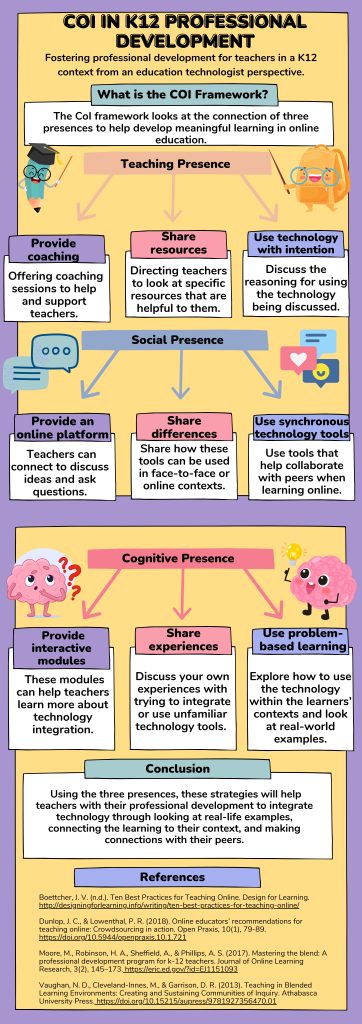
The CoI framework was developed to underscore the connection between three presences: teaching, social, and cognitive. Its primary goal is to cultivate ‘an engaged online learning community’ (Dunlap & Lowenthal, 2018, p.81). Using the Community of Inquiry (CoI) framework, this infographic will provide strategies to help K12 teachers integrate technology into the classroom from an education technologist’s perspective. As they are responsible for coaching teachers, the strategies are targeted to education technologists to help with teacher professional development (Reid, 2018).
Teaching Presence
Teachers can be unfamiliar with integrating new technology into the classroom (Moore et al., 2017), so providing them with coaching, whether in person, online through Zoom, or Microsoft Teams, is essential. Through coaching, it is crucial to guide the teachers using the technology tool and offer support when they need help. These coaching sessions can also be done individually or in groups. As teachers participate in these training sessions, it is imperative to share extra resources (Vaughan et al., 2013). These resources help bring more context to how these technologies can be used in their classrooms. While it is great to use technology in class, it is vital to use it intentionally (Dunlap & Lowenthal, 2018). There needs to be a reason for teachers using this technology (will it help students? Help with busy work?).
Social Presence
After coaching teachers, they may need extra help or want to discuss it with their colleagues. By providing an online platform, they can connect, ask questions, share ideas and examples of technology use, and more (Boettcher, n.d.). Further, teachers need to know how these technologies can be used either for online or face-to-face learning, so one strategy is to share the differences and provide examples of how they can be used for either context (Vaughan et al., 2013). Finally, when training online, use synchronous technology tools to help foster engagement and connections with the participating teachers. These tools can help break the ice and help learners become more comfortable contributing to the discussion.
Cognitive Presence
When training teachers, interactive learning modules should be included, as this can help them increase their technology skills, further develop their knowledge, and, therefore, be more likely to adapt classroom practice to incorporate what they have learned (Moore et al., 2017). In these learning modules and when providing coaching, create problem-based learning activities to allow teachers to connect to their classrooms and teaching styles and, therefore, have more context on how the technology can be used (Vaughan et al., 2013). Finally, it can be challenging to build relationships online, so be sure to share experiences with learners, as this can help them feel more comfortable sharing their own and thus learn more from each other (Vaughan et al., 2013).
These strategies help create a teacher community where teachers can learn from education technologists and each other to incorporate new technology meaningfully in the classroom, whether online or face-to-face.
Dunlap, J. C., & Lowenthal, P. R. (2018). Online educators’ recommendations for teaching online: Crowdsourcing in action. Open Praxis, 10(1), 79. https://doi.org/10.5944/openpraxis.10.1.721
Moore, M., Robinson, H. A., Sheffield, A., & Phillips, A. S. (2017). Mastering the blend: A professional development program for k-12 teachers. Journal of Online Learning Research, 3(2), 145–173. https://eric.ed.gov/?id=EJ1151093
Vaughan, N., Hrastinski, S., & D. Randy Garrison. (2013). Teaching in blended learning environments: Creating and sustaining communities of inquiry. https://doi.org/10.15215/aupress/9781927356470.01
Much like in-person teaching, online teaching places a significant emphasis on community. As Dunlap and Lowenthal (2018) and Boettcher (n.d.) discussed, establishing a community in an online class is crucial. It helps students form connections and allows them to be social in ways that mirror a face-to-face classroom. Whether students are learning in person or online, the social aspect of learning remains a vital component.
Providing students with choices is a fundamental aspect of education. The concept of UDL in online learning, as highlighted by Dunlap & Lowenthal (2018), is a powerful tool. It empowers students to demonstrate their understanding in ways that suit their learning style and meet the course requirements. This adaptability makes students feel comfortable and allows them to connect their experiences with their learning (Boettcher, n.d.).
While there are similarities to in-person and online teaching, there are differences in how to facilitate online classes as they may require a different set of skills. Bull (2013) discussed eight roles of an online facilitator. While some can be found in an in-person facilitator, such as a cheerleader and co-learner, some are more for online courses like Big Brother, where everything is documented, and teachers can see when students are online and guide them to the appropriate resources or course content.
In my initial thoughts, I discussed the similarities between in-person and online teaching. I still have some questions I would like to explore as I go through this course, especially regarding how to use these skills in a K12 setting.
2 questions
K-12 education is primarily done in face-to-face classrooms; which skills and roles discussed in facilitating digital environments can be transferred to in-person teaching?
In connection with the first question. If there are skills from teaching online courses that can be transferred to K12 in-person settings, how can we use these skills when we are not facilitating online?
1 Metaphor
Through reading about digital facilitation, a metaphor that goes well with my thoughts and questions is an image of a road map. Teaching and learning is a journey, and as Bull (2013) pointed out, we are here to guide our students throughout. While the path may not be straight, and mistakes may be made, the journey and learning along the way are what matters.
Credit: Image by coolboy on Freepik
References
Boettcher, J. V. (n.d.). Ten best practices for teaching online. Design for Learning. http://designingforlearning.info/writing/ten-best-practices-for-teaching-online/
Bull, B. (2013). Eight roles of an effective online teacher. Faculty Focus. https://www.facultyfocus.com/articles/online-education/eight-roles-of-an-effective-online-teacher/
Dunlap, J. C., & Lowenthal, P. R. (2018). Online educators’ recommendations for teaching online: Crowdsourcing in action. Open Praxis, 10(1), 79-89. https://doi.org/10.5944/openpraxis.10.1.721
When I think about the design thinking process, I am not very surprised by the use of artificial intelligence by those who participated in the survey. Those who did discuss their use of AI were using chatbots, which Diliberti et al. (2024) also discuss in their article as one of the most popular uses among teachers. The feedback they gave in the initial survey was helpful and had me reflect on changing from my original idea of creating a written guide to having something more interactive, which is when I shifted to a toolkit.
It was important to have interactive elements and resources they could use, as that was mentioned. All the participants noted the need for videos, checklists, infographics, etc. Further, there was mention of the lack of human interaction when using AI, so it was essential to have some community of practice (CoP) element as part of the toolkit. As we learned throughout the MALAT program, a CoP allows those with common interests or concerns to interact and learn to help build new knowledge or practices (Edmonton Regional Learning Consortium, 2016). As I built the toolkit, this feedback was constantly in the back of my mind, and I kept the participants updated when changes were made to get more feedback.
When the digital resource creation is finished, I want to share it with those who participated throughout the design process and with other educators and professionals. This resource has the potential to enhance the use of AI in K-12 education significantly, and I am excited to see the impact it can have. Further, once this course is finished, it will be a resource that can continually grow and change by adding more AI tools and creating more video explanations and digital resources that can be used. With the forum and a CoP, teachers can use this to discuss their AI and use any helpful tips or lesson plans they have used. Thus, the following steps will be to continue adding to the toolkit and introducing it to educators and those who might find it helpful to build that community of practice.
To conclude, this design thinking process was very helpful in guiding the creation of the digital resource. Without those who participated in the survey, I do not think the digital resource would look as it does. It shows the importance of conducting a needs assessment and keeping those who participated updated to continuously receive feedback, especially with those with whom you plan to create a digital resource.
References
Diliberti, M. K., Schwartz, H. L., Doan, S., Shapiro, A., Rainey, L. R., & Lake, R. J. (2024, April 17). Using Artificial Intelligence Tools in K–12 Classrooms. RAND. https://www.rand.org/pubs/research_reports/RRA956-21.html
Edmonton Regional Learning Consortium. (2016). What is a community of practice? Community of Practice. https://www.communityofpractice.ca/background/what-is-a-community-of-practice/
In my second blog about user experience with AI for personalized language learning, I discussed some issues about the feedback or lack thereof that I have received. Since that blog, I have been using Duolingo Max, which I got a free trial for. Since starting this free trial, I have received better feedback and more personalized lessons. For example, I am now able to get explanations for my mistakes, and it explains the grammar rules so I understand not to make them again. In some of my research on using Duolingo, some users expressed frustration with the cost of either Super Duolingo or Duolingo Max (Anderson & Charaf, 2020). If I did not have a free trial, Duolingo would cost around $20 a month, and I am unsure if it would be worth it. While there is more personalization in that I get feedback and can roleplay and practice previous mistakes, $20 a month can be costly, depending on various financial situations. I like using ChatGPT, as I can get more personalization and feedback for free.
As I continued to use ChatGPT, I added a microphone extension. Similarly to role-playing through Duolingo Max, I can decide on a theme, prompt the bot to converse with it, and then receive feedback based on my pronunciation. As of yet, I have not had issues with speech recognition that some articles have discussed their students having experienced (Godwin-Jones, 2024). This could be due to some inherent bias that the machine has for countries that have different accents than North America.
If I compare these two AI-powered tools for personalized language education, I am still unsure which one is more advantageous. On one hand, you have Duolingo, which is more gamified and constantly sends out reminders, so you keep practising (Shortt et al., 2021). On the other hand, you have ChatGPT, where you are more in charge of your learning. Thus, to answer my previous question on how effective either one of these tools is, it depends on what one is looking for.
References
Anderson, P., & Charaf, A. (2020). The reviews of users of the duolingo application: Usability and objectivity in the learning process. International Journal of Research – Granthaalayah. https://doi.org/10.29121/granthaalayah.v8.i9.2020.1326
Godwin-Jones, R. (2024). Distributed agency in second language learning and teaching through generative ai. ArXiv (Cornell University). https://doi.org/10.48550/arxiv.2403.20216
Shortt, M., Tilak, S., Kuznetcova, I., Martens, B., & Akinkuolie, B. (2021). Gamification in mobile-assisted language learning: A systematic review of duolingo literature from public release of 2012 to early 2020. Computer Assisted Language Learning, 36(3), 1–38. https://doi.org/10.1080/09588221.2021.1933540
In my initial post about researching AI for personalized learning, I wanted to investigate the credibility and accuracy of using these tools for language learning. My idea was to use both Duolingo and ChatGPT to compare the information given to me when learning French. However, while I have a basic understanding of French, it would be difficult to test the credibility and accuracy of the information, so I decided to switch my topic to user experience instead.
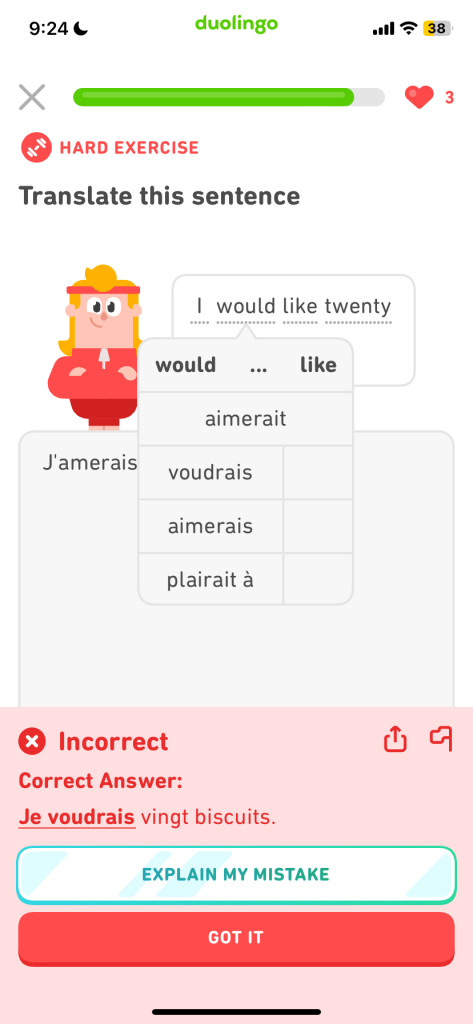
The mobile application Duolingo is not new to me; I have used it but have never taken the time to examine it as a user critically. As Anderson and Charaf (2020) pointed out, when looking at user reviews in the Google Play Store, many people discussed that paying a monthly subscription fee is the best use of the app. There are now two tiers of a paid subscription: Super Duolingo and Duolingo Max. While both tiers offer unlimited hearts and practice, DuolingoMax is where you can get a lot more personalized learning, as it will explain your answers or mistakes. You can roleplay (Duolingo Team, 2023). I currently only use the free version, and so far, there are things I enjoy, such as being easy to navigate (Munday, 2015); gamification is a motivator as it reminds me to keep practicing and gives me points. The downsides are limited lives, inability to practice mistakes, and inability to get explanations for my mistakes. To get the whole experience with Duolingo, near the end, I will use the free trial of Duolingo Max.
A mistake I made in Duolingo, but I cannot get an explanation
I have also been using ChatGPT to learn French. When using a tool like ChatGPT, it is essential to be mindful of wording your prompt (J.White, personal communication, April 12, 2024). My first time using the tool, I wanted a refresher on conjugating verbs to the proper tenses but in a more engaging way. After a few prompts, I decided to try a bingo game; ChatGPT would give me a conjugated verb, and I would have to write the tense in which it is. While the game was simple enough, I did catch some errors, such as inputting the wrong tense, but the program told me the answer was correct. While Huang and Li (2023) mentioned that using this tool can weaken people’s abilities to self-correct, I used it to double-check my answer with a verb conjugation website: https://leconjugueur.lefigaro.fr/. Thus, while using ChatGPT is not perfect, it allows me to check my work, and then I can correct the program by letting it know my answer was incorrect. A positive thing about using this tool is that I immediately get instant feedback and explanations, which I do not do with Duolingo.
An answer I gave to the verb “jouerai” ChatGPT telling me my answer is correct (passé composé) when it was not (futur simple)
As I continue to use these tools, I will also be critically aware of the potential for mistaken information and the program’s biases (Huang & Li, 2023). Further, I have yet to try using speech recognition with ChatGPT; there have been studies where students experienced tools like this needing help with speech recognition (Jeon, 2022), so this is something else I will explore. I have a question: How effective are AI-empowered applications in personalizing language learning?
References
Anderson, P., & Charaf, A. (2020). The reviews of users of the duolingo application: Usability and objectivity in the learning process. International Journal of Research – Granthaalayah. https://doi.org/10.29121/granthaalayah.v8.i9.2020.1326
Huang, J., & Li, S. (2023). Opportunities and challenges in the application of chatgpt in foreign language teaching. International Journal of Education and Social Science Research, 06(04), 75–89. https://doi.org/10.37500/ijessr.2023.6406
Jeon, J. (2022). Exploring ai chatbot affordances in the efl classroom: Young learners’ experiences and perspectives. Computer Assisted Language Learning, 37(1-2), 1–26. https://doi.org/10.1080/09588221.2021.2021241
Munday, P. (2015). The case for using duolingo as part of the language classroom experience. RIED. Revista Iberoamericana de Educación a Distancia, 19(1). https://doi.org/10.5944/ried.19.1.14581