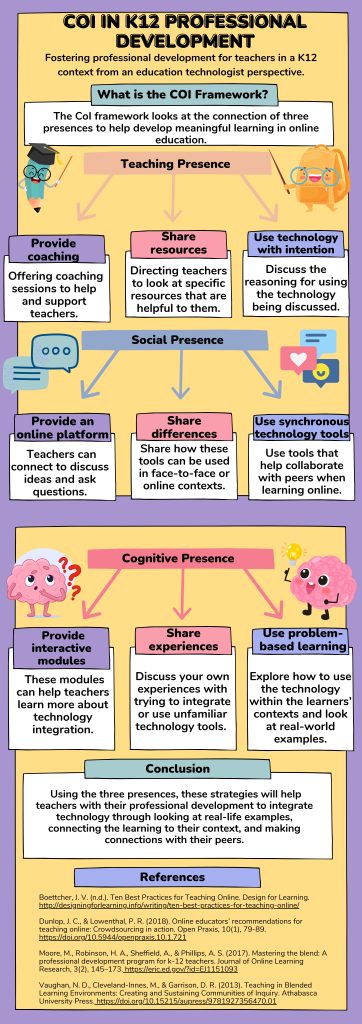
The CoI framework was developed to underscore the connection between three presences: teaching, social, and cognitive. Its primary goal is to cultivate ‘an engaged online learning community’ (Dunlap & Lowenthal, 2018, p.81). Using the Community of Inquiry (CoI) framework, this infographic will provide strategies to help K12 teachers integrate technology into the classroom from an education technologist’s perspective. As they are responsible for coaching teachers, the strategies are targeted to education technologists to help with teacher professional development (Reid, 2018).
Teaching Presence
Teachers can be unfamiliar with integrating new technology into the classroom (Moore et al., 2017), so providing them with coaching, whether in person, online through Zoom, or Microsoft Teams, is essential. Through coaching, it is crucial to guide the teachers using the technology tool and offer support when they need help. These coaching sessions can also be done individually or in groups. As teachers participate in these training sessions, it is imperative to share extra resources (Vaughan et al., 2013). These resources help bring more context to how these technologies can be used in their classrooms. While it is great to use technology in class, it is vital to use it intentionally (Dunlap & Lowenthal, 2018). There needs to be a reason for teachers using this technology (will it help students? Help with busy work?).
Social Presence
After coaching teachers, they may need extra help or want to discuss it with their colleagues. By providing an online platform, they can connect, ask questions, share ideas and examples of technology use, and more (Boettcher, n.d.). Further, teachers need to know how these technologies can be used either for online or face-to-face learning, so one strategy is to share the differences and provide examples of how they can be used for either context (Vaughan et al., 2013). Finally, when training online, use synchronous technology tools to help foster engagement and connections with the participating teachers. These tools can help break the ice and help learners become more comfortable contributing to the discussion.
Cognitive Presence
When training teachers, interactive learning modules should be included, as this can help them increase their technology skills, further develop their knowledge, and, therefore, be more likely to adapt classroom practice to incorporate what they have learned (Moore et al., 2017). In these learning modules and when providing coaching, create problem-based learning activities to allow teachers to connect to their classrooms and teaching styles and, therefore, have more context on how the technology can be used (Vaughan et al., 2013). Finally, it can be challenging to build relationships online, so be sure to share experiences with learners, as this can help them feel more comfortable sharing their own and thus learn more from each other (Vaughan et al., 2013).
These strategies help create a teacher community where teachers can learn from education technologists and each other to incorporate new technology meaningfully in the classroom, whether online or face-to-face.
References
Boettcher, J. V. (n.d.). Ten best practices for teaching online – designing for learning. Designingforlearning.info. http://designingforlearning.info/writing/ten-best-practices-for-teaching-online/
Dunlap, J. C., & Lowenthal, P. R. (2018). Online educators’ recommendations for teaching online: Crowdsourcing in action. Open Praxis, 10(1), 79. https://doi.org/10.5944/openpraxis.10.1.721
Moore, M., Robinson, H. A., Sheffield, A., & Phillips, A. S. (2017). Mastering the blend: A professional development program for k-12 teachers. Journal of Online Learning Research, 3(2), 145–173. https://eric.ed.gov/?id=EJ1151093
Reid, P. (2018, December 10). EdTechs and instructional designers—what’s the difference? Er.educause.edu. https://er.educause.edu/articles/2018/12/edtechs-and-instructional-designers-whats-the-difference
Vaughan, N., Hrastinski, S., & D. Randy Garrison. (2013). Teaching in blended learning environments: Creating and sustaining communities of inquiry. https://doi.org/10.15215/aupress/9781927356470.01
Really well done Catherine. I struggled mightily to apply adult online Ed to K-12 but I love your PD approach. I don’t have a question, only bravo.
Thanks, Matt! I also struggled to see how to use the CoI framework with students in younger grades, but I really enjoyed your strategies and infographic.
Hi Catherine,
Your infographic resonated with me as I work alongside Educational Technologists as they support teachers learning about technology. I could relate to all the strategies you incorporated. I like how you started with teaching presence and the emphasis on the need for a reason teachers would use the technology being taught. This reason, which ties back to the value of the chosen technology for teachers and students, made me reflect on our lessons learned from LRNT 525 on leading change. Most of all, I wonder about the teachers who are nervous and scared about using technology. Do you have thoughts about how to approach teachers who may try to avoid engaging with Educational Technologists before being able to apply the facilitation strategies?
Cheers,
~M
Hi Marni,
Thanks for your comment! I think that it is valid for teachers to be nervous about using technology, especially when it is new and unfamiliar to them. I think the best way to approach them would be to have an informal meeting one-on-one to just showcase the technology without bombarding them with too much information at once. Moreover, after introducing the technology, let them explore it independently so they can get a feel of what it can offer them in their classroom context, once they have the chance to use it, then I would set up another meeting to assess how they feel about the technology and answer any questions or concerns they may have and from there use some of the strategies outlined in the infographic, especially the coaching one.
I hope this answers you question!
-Catherine
Thanks, Catherine! I agree that the one-on-one coaching sessions would make a difference. I know the Ed Techs I work with also have a digital literacy needs assessment that helps with determining technology skill levels before facilitating sessions. ~M