Self directed learning as a theoretical framework

One theoretical framework I am interested in learning more about is self-directed learning (SDL).

From what I’ve learned in the program to date, I understand SDL to be part of adult learning theory and the theory of constructivism. Within SDL, I am aware of two main concepts; that of learner control and that of motivation.

Questions I have about SDL are related to worker expectations for on-demand learning experiences. I could easily speculate about the advantages of on-demand learning environments for learner control, but what are the disadvantages? Is there such a thing as too much learner control in today’s digital environments? Would unlimited learner control help or hurt learner motivations?

Disseminating Research

As I move toward the final research paper in the MALAT program, I’m starting to think about how I might use the research in my professional life, once my time as a graduate student concludes.

I am not interested in pursuing academic forms of publication, such as peer-reviewed journals or academic conferences.

Rather, I intend to disseminate my research through publication on my website. It will be relatively easy to optimize the web page used for my research with relevant keywords, as these need to be identified through the research process.

It seems like my intended research topic (the state of professional development for instructional designers) could easily be adapted as a whitepaper. The intent of the whitepaper would be to encourage future customers to purchase an online course from me or to hire me as a consultant for specific projects.

Like most white papers used for content marketing, my research will be open access. However, I will make the content available for download only in exchange for a reader’s email address; asking for contact information will allow me to follow up with the reader.

To promote the white paper, I will use a combination of social media channels, such as LinkedIn, Facebook, and Instagram posts. I will adapt my chosen keywords into a combination of unique and popular hashtags that will help my research be found.

How to develop an active social presence in digital learning environments (Assignment 1)

Rationale

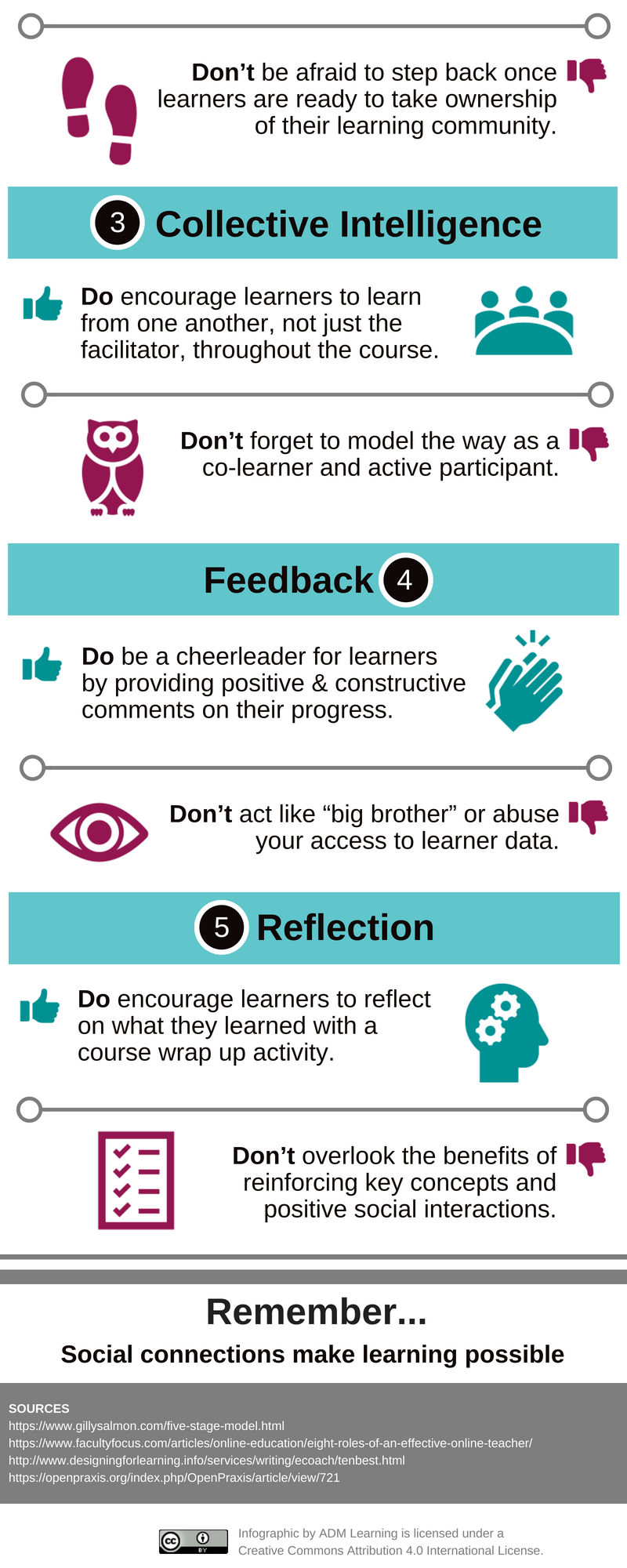
My top five facilitation strategies focus on social presence because I have a strong tendency toward introversion. Knowing how essential social interactions are for learning (Boettcher, 2013), developing my social presence as an educator would benefit learners by reducing transactional distance with learners during online facilitation (Dunlap & Lowenthal, 2018).

My first facilitation strategy focuses on interactivity. Learner-instructor interaction is of three interactions essential to learning. Digital learning environments create opportunities for educators to interact with learners in ways not possible through face-to-face, in-person facilitation (Boettcher, 2013). An educator’s efforts to develop his or her social presence should not detract from opportunities for learners to interact with their peers or instructional content (Dunlap & Lowenthal, 2018).

The second strategy focuses on connection. Educators can connect with learners at the start of a course and then help learners connect with one another as the course progresses (Salmon, 2018; Bull, 2013). The role of educators is changing from that of an instructor who delivers knowledge to that of a facilitator who encourages learners to take an active role in their learning.

Next, educators can bring together a group to benefit from their collective intelligence (Dunlap & Lowenthal, 2018). Educators offer only one perspective to learners, but adult learners have a wealth of skills and life experiences to share with others (Dunlap & Lowenthal, 2018). By creating opportunities for learners to learn from one another, and by being life-long learners themselves (Bull, 2013), educators can deepen the learning experience for everyone.

The fourth facilitation strategy focuses on feedback. Learners need to feel supported throughout the learning process (Dunlap & Lowenthal, 2018). They need sometimes need external motivation such as words of encouragement from facilitators to stay engaged (Bull, 2013). Learners benefit when educators offer feedback that is timely, constructive, and positive. Educators may have access to learner data that can guide their feedback to learners; at the same time, educators need to make sure they use learning analytics ethically and without abusing power (Bull, 2013).

Lastly, the final facilitation strategy focuses on reflection. Educators who create wrap-up activities to reinforce key concepts encourage learners to reflect on their experiences and relate them to their own lives (Boettcher, 2013). Learners also benefit when educators highlight the positive interactions that occurred throughout the learning experience (Boettcher, 2013).

Ultimately, social connections make learning possible, and there are many facilitation tips and strategies that educators can and should leverage to develop their social presence. Given my natural inclination toward independent, self-directed learning, I focused on strategies for developing my social presence as an area of improvement for my own facilitation skills.

References

Boettcher, J. (2013). Ten Best Practices for Teaching Online Quick Guide for New Online faculty. Retrieved September 15, 2018, from http://www.designingforlearning.info/services/writing/ecoach/tenbest.html

Bull, B. (2013). Eight Roles of an Effective Online Teacher. Retrieved September 15, 2018, from http://www.facultyfocus.com/articles/online-education/eight-roles-of-an-effective-online-teacher/

Dunlap, J. C., & Lowenthal, P. R. (2018). Online educators’ recommendations for teaching online: Crowdsourcing in action. Open Praxis10(1), 79–89. https://doi.org/10.5944/openpraxis.10.1.721

Salmon, G. (2018). The five-stage model. Retrieved September 15, 2018, from https://www.gillysalmon.com/five-stage-model.html


Reflecting on digital learning resource

The most surprising thing I learned by participating in the design thinking process was the number of ideas I was able to generate for a specific problem. Taking the time to explore options yielded a more creative solution than I had expected. The most surprising aspect of designing and developing a prototype of this particular digital learning resource was how disengaged the client became after sharing their problem with me. I had anticipated more client involvement in selecting and designing a solution.

I did not receive any suggestions for improvement of the resource itself, which was unexpected given that prototypes are typically starting points for a final deliverable. Feedback on my design plan included the need for greater detail on how the resource aligns with learning theory.

My next step with the resource will be reaching out to the client for their feedback on both the digital learning resource and the process of creating it. I can see myself using the design thinking process in the future with an emphasis on the ideation, prototype, and testing phases. Currently, a large amount of my time is dedicated to assessing learner needs and developing a deliverable in response to those needs, but more time could be spent exploring solutions and seeking feedback.


Developing a design plan

Below is a design plan for the development of a digital learning resource.

Description

The purpose of the resource is to help learners create an LMS account correctly the first time in order to prevent duplicate LMS accounts (and associated manual data cleanup) from being created in the future.

Learning Goals

The desired learning outcome is for a learner to create an LMS account correctly. After using the proposed resource, learners will be able to:

  • Identify what issues can occur during the account creation process (cognitive goal)
  • Recognize how those issues might impact them later on (constructivist goal)
  • Mitigate issues during the account creation process (behavioural goal)

Intended Audience

The intended audience for the digital learning resource is first-time participants in a tax academy course for a large tax software company.

One participant demographic is new immigrants to Canada who know English as a second language; they are seeking educational credentials or short-term employment opportunities to help them get established in the country.

Another participant demographic is retired individuals, many who have with limited computer skills (compared to full-time professional workers who use computers on a regular basis); this demographic is looking for short-term employment opportunities to supplement their retirement income.

Rationale

Instructions for instructors and learners are currently available as written descriptions with limited use of annotated screenshots and no opportunity for interaction. Instructions currently explain what instructors and learners need to do, with limited details on how to do it and no explanation as to why it is important to follow these instructions carefully.

The proposed digital resource will build on existing content using a combination of text, audio, and video to provide a more interactive and engaging experience for learners. It will also focus heavily on why content to provide more context for learners.

See the section on Learning Theories (below) for details as to why this approach is anticipated to be effective.

Tools

The following options were evaluated against the Bates (2015) SECTIONS model (students, ease of use, cost, teaching, interactivity, organizational issues, security & privacy):

  • Writing tools (improvement app, grammar checker, word processing)
  • Language tools (online translator, language learning app)
  • Video tools (creation, editing, effects)
  • Graphic design tools (typography, infographics, screen captures, image collections, editing)
  • Presentation tools (presentation/document creator/converter/ viewer/editor, PDF/PPT)
  • Content sharing platforms (microlearning, presentations, videos)
  • Audio tools (recording, editing)
  • Animation tools (screencasting, explainer videos)
  • Internet tools (HTML5, web browser)
  • Learner response tools (form, survey, quizzing, discussion boards)

Whatever tool I use must not require the students to navigate any technology, with the rationale being that students need to be focused on learning how to use the LMS, not on how to use other learning technologies. It also aligns with the student demographics described above. The studentsease of use and networking considerations eliminated the learner response tools category.

I also eliminated content sharing platforms and internet tools due to organizational issues. The organization already has its own mechanisms for storing learning content, so a content sharing platform and would likely create security and privacy issues the organization is not prepared to deal with. Use of any internet-based tools would also fall under the organization’s existing platform, such as its intranet, network, shared drives, etc.

After considering the time pressures many instructors are under and the many environmental factors they need to manage in the classroom, I also eliminated language tools like Google Translate as a category based on the teaching assessment criteria. Introducing an additional tool and multiple languages for instructors adds an additional level of complexity to their instruction.

The remaining categories were all primarily content development tools used by instructional designers to create content. The remaining considerations in the SECTIONS model are cost and interaction.

Cost criteria for my final selection include the need for rapid development due to a short timeline, no cost for resource hosting and delivery, and no overhead other than access to licensing and subscriptions I have already purchased for paying clients. I am less concerned about ongoing maintenance costs because the content will focus on why. In my professional experience, why content is typically stable and unchanging over time, so content updates should be minimal. Based on the cost criteria, below is a list of tools I have free access to:

  • Writing tools (Microsoft Word, Apple Pages, Grammarly)
  • Video and audio tools (Adobe Premiere, iMovie)
  • Graphic design tools (Adobe Photoshop, Canva, Piktochart, Pixabay, Pexels)
  • Presentation tools (Apple Keynote, Microsoft PowerPoint, Microsoft Sway)
  • Animation tools (PowToon, Articulate 360 Rise)

The need for minimal student interaction with the technology was outlined above, which means the resource must have designed interaction, not inherent or learner-generated interaction. Because interaction with the resource will be limited, the resource should encourage interaction among students and with the course instructor.

Based on these considerations, I decided to use a combination of writing, graphic design, and animation tools. The final proposed resource will be an animated infographic created in PowToon. The inputs to the video will be a decision tree with supporting text written in Microsoft Word and checked in Grammarly, then sketched out visually on paper for rapid development, and finally designed as an infographic in Canva. The animated infographic will illustrate the different outcomes account creation errors can generate, as well as the correct path to follow to create an LMS account successfully.

Assessment Plan

Effectiveness can be measured in several ways, according to Kirkpatrick’s evaluation model (citation needed – suggestions?). Being able to measure a year-over-year decrease in duplicate LMS accounts being created is the ultimate result being sought from a business perspective.

From a learner perspective, the goal is less pain and suffering (stakeholder’s exact words) as a result of the LMS creation process. Measures could include the extent to which instructors use the resource to support their teaching and anecdotal feedback from learners and instructors on how easy it was to follow the account setup process. Supporting measures could include an observable decrease in the manual effort needed to reconcile and manage accounts, as this would indicate fewer issues are being encountered during the initial account setup.

Learning Theories & Instructional Design Principles Used

After evaluating existing learning materials, it appears a behaviourist approach is being used to support instructors and learners. Using a combination of learning theories can provide a more robust and effective solution (citation needed – any suggestions?). The heart of the instructional design approach to be used is succinctly summarized in the following quote:

“The three schools of thought can, in fact, be used as a taxonomy for learning. Behaviorists’ strategies can be used to teach the what (facts); cognitive strategies can be used to teach the how (processes and principles); and constructivist strategies can be used to teach the why (higher-level thinking that promotes personal meaning, and situated and contextual learning).” (Ally, 2008)

Because the resource will use a combination of multimedia, it will be important to follow Mayer’s instructional design principles as part of the cognitive load theory of multimedia learning (citation needed). Applying these principles can help ensure learners have the mental capacity needed to focus on what is being asked of them rather than on extraneous details.

Instructions for Use:

The following instructions will be provided to instructors:

  1. Set up the classroom with required technology (laptop, internet access, TV/projector)
  2. At the appropriate time in the class curriculum, hand out hard copies of the account creation instructions
  3. Verbally walk through the instructions with learners on how to create their account.
  4. Open the animated video in a web browser and play from start to finish.
  5. Ask students if they have any questions, and answer any that come up.
  6. Display a static version of the infographic on the classroom TV/projector.
  7. Direct students to begin creating their own account.
  8. Encourage learners to use the infographic as a quality assurance tool throughout the account creation process.

Plan for Use:

The resource is intended for internal company use. It will be used by instructors on the first day of an in-person introductory tax academy course.

The resource will not be shared publicly as an open resource, for two reasons:

  1. The resource is intended for a specific instructional context and will provide little value to external third-parties, other than to serve as an example that can be adapted for other instructional purposes.
  2. Openly sharing instructions on how to create an LMS account could create a security risk for the tax academy if non-registered members of the general public attempt to hack the LMS in an attempt to by-pass formal registration.

Selecting the best tool for the job

“If all you have is a hammer, everything looks like a nail” — Abraham Maslow

Having a toolbox full of tools can make it easier to fix problems. But how do you know which tool to use? Below is a quick overview of different theoretical frameworks that can be used to select the right technology tool for creating a digital learning resource:

  • SECTIONS – considers the following factors: students, ease of use, cost, teaching, interaction, organizational issues, networking, security and privacy
  • RAT – assesses the value of the tool based on whether it replaces, amplifies, or transforms instruction and learning goals
  • SAMR – assesses technology similar to RAT: substitution (replaces existing tech), augmentation (replaces existing tech and has improvements), modification (redesigns learning tasks), redefinition (allows for brand new learning tasks)
  • TPACK – explains three levels of knowledge needed for instruction: technological (mostly digital), pedagogical (learning strategies), and content (subject matter expertise)

After reading articles on SECTIONS and RAT in depth and skimming articles on SMAR and TPACK, the theoretical framework I’ve chosen to use is SECTIONS.

  • What are the affordances and limitations of the framework?
    • The framework can be used for both in person and digital learning environments.
    • The framework provides a macro versus micro perspective, which is useful at the outset of media selection.
    • The recommendations contained within the framework are practical in a variety of contexts.
  • What are the limitations of the framework?
    • The framework does not consider social, cultural, or political factors external to an organization, which is particularly important for international contexts.
    • The framework does not consider the internal factors of learners (e.g., motivation, satisfaction) that could affect a successful outcome.
    • The framework does not address how to use media once it has been selected.
    • The framework does not consider which content might lend itself to certain media more than others.
  • How well does the framework align to your existing educational and pedagogical practices?
    • I like the SECTIONS framework because it has clearly defined criteria and guidelines that can be applied. The framework provides a clear structure that can guide my thinking and conversations with clients. The other frameworks seemed more theoretical and abstract, which would be harder to explain to people without a background in learning and technology.
    • My preference is to let content (second only to learners) drive media selection, and this framework does not allow for that.
  • How did the application of the framework impact your decision-making process?
    • I have not yet applied the framework because I am still assessing the existing materials to see how the content can be improved. Once I have a solid grasp on what content needs to be created, I will be in a better position to select the appropriate media and tool. However, after reviewing the top tools for learning, I have identified the following categories that I will assess against the framework:
      • Writing tools
      • Language tools
      • Video tools
      • Graphic design tools
      • Presentation tools
      • Content sharing platforms
      • Audio tools
      • Animation tools
      • Internet tools
      • Learner response tools
  • Which components of the framework did you find most valuable to your decision-making process? Why?
    • It would be difficult to call out any one component of the framework as more useful than another, but I would have appreciated a greater level of detail regarding organizational issues, networking, and security and privacy, as those components were not as robust as the other components.

Brainstorming outcomes

Challenge

How might we prevent duplicate LMS accounts from being created? How might we create an LMS account without using an employee ID?

Potential solutions

How might we make creating an LMS account easier to understand so we don’t need to modify the LMS?

  • Provide better sign up instructions for creating an LMS account
    • For students
      • Add instructions onto the sign up page for an LMS account
      • Use a combination of written, verbal, and visual instructions to explain how to create an LMS account
      • Provide instructions on how to create an LMS account in different languages for ESL learners
      • Explain to students why we need their LMS account set up correctly
    • For instructors
      • Provide better instructions/resources for instructors
    • Introduce non-technology QA mechanisms
      • Generate a QA checklist of considerations for learners as they create an LMS account
      • Use a buddy system to have learners help each other set up their LMS accounts

How might we use a unique identifier other than email to create an LMS account?

  • Provide a unique identifier instead of asking for one
    • Issue student IDs instead of employee IDs
    • Use an LMS-issued identifier instead of one generated by the company
    • Add a new category for students to the payroll system
  • Use other personal identifiers to create an LMS account
    • social insurance numbers (less likely to be duplicated)
    • healthcare numbers (less likely to be duplicated)
    • drivers licenses (less likely to be duplicated)
    • social media accounts (less likely to be forgotten)
    • photo recognition software/retina scans

How might we change how the company uses email as the unique identifier for LMS accounts?

  • Validate email addresses for LMS accounts
    • Create a new sign up form that bridges the gap between existing technologies
    • Modify other data collection forms (e.g., payment collection, class scheduling) so email addresses can be validated
  • Change the point in the process where email information is collected
    • Collect learner email addresses earlier
    • Verify learner emails before the first day of class
  • Provide a unique identifier instead of asking for one
    • Issue student emails to learners instead of requesting an email address for their LMS account
    • Issue company email aliases that link to personal email addresses
  • Link a personal email address to a different unique identifier

Broader technology considerations

  • Reconsider your LMS
    • Remove the need for an LMS account altogether
    • Change the LMS provider to one who better supports the company’s requirements
    • Challenge the need for having a unique identifier
  • Learn from other institutions that have a mix of students and employees about how they transfer students to employee status
  • Address specific failure points in the process
    • Check to see if learners already have an existing LMS account
    • Address how to recover a user ID or password/change the password recovery option


Design thinking critical reflection

Below is a critical reflection on my experience completing the first two phases of design thinking – empathy and define – following Stanford’s d.school model. My reflection follows the what – so what – now what model developed by Borton (1970).

What…

My goal in the empathy phase was to understand a specific instructional context and learner characteristics. In the define phase, my goal was to reframe my initial understanding as a clearly defined problem statement or design challenge.

In the first phase, I met with multiple stakeholders and developed a journey map based on interviews and observations, and in the second phase, I used a point-of-view madlib and how-might-we questions as techniques for defining the design challenge. Throughout both phases, I felt quite confident in my abilities, since I’ve previously used most of the techniques suggested through Stanford’s d.school and IDEO’s design kit model; however, I did feel somewhat constrained by the limited time available for me to explore the challenge in-depth.

I thought sketching out the instructional context and learner characteristics as part of a journey map went quite well in the empathy phase, while combining multiple point-of-view frameworks to create a robust problem statement went well in the define phase. I did notice though that I was uncomfortable sharing the outcomes of this work with the project’s internal stakeholders. The work felt unfinished and was not as polished as I would have liked.

So What…

What was important to me about my participation in the empathy phase was my ability to distill a very complex issue into a simple diagram that allowed me to easily identify potential pain points for learners.

The most important part of the define phase for me was reframing the problem, as the stakeholders presented it, into a problem that was more open to exploring possibilities for solutions.

During the empathy phase, I learned that my ability to analyze my clients’ process maps has helped me learn a new skill: how to visualize and document business processes on my own. During the define phase, I also learned the value of how-might-we questions, which led me down lines of questioning I hadn’t previously considered and took me outside of my comfort zone in exploring solutions.

Now What…

Now that the define and empathy phases are complete, I think I can continue to improve my knowledge and skills by looking for opportunities to ask more effective questions as I work on other projects. I’d also like to seek out additional resources on questioning and interviewing techniques. If anyone has suggestions, I’d love to hear them.

Defining the challenge

After reviewing the define methods in the Bootcamp Bootleg and the Design Kit, I think the most helpful methods for my design challenge are the 2×2 matrix, point of view Madlib, and how might we questions. Outlined below is an illustration of how I applied each of these methods.

2×2 Matrix

The 2×2 matrix outlined in Stanford’s Bootcamp Bootleg (2016) helped me identify the types of users affected by my challenge and what their requirements were. Two examples are below. Another example not shown included defining my users by regional vs head office and temporary vs permanent. This allowed me to confirm that I was focusing on regional, temporary employees, not permanent employees of any kind, or temporary employees who work in head office roles. In the example below, you’ll see I used the same horizontal spectrum in both diagrams, hired vs not hired.  This allowed me to link what I documented in the first diagram with another level of detail in the second diagram.


Point of View Madlib

The point of view Madlib outlined in the Bootcamp Bootleg provided the following basic structure for me to work with: “[USER] needs to [USER’S NEED] because [SURPRISING INSIGHT]” (Stanford, 2016, p. 21). Using this fill-in-the-blank approach, I came up with the following point of view statement for my challenge:

[Tax academy learners] need to [create an LMS account without an employee ID as the unique identifier] because [not all learners who complete tax academy training are hired].

I found this statement accurate but not inspiring, so I expanded on it by using a couple of the statements outlined by Wollery (2017), noted in italics below:

[I] was amazed to realize that… using an email address as the unique identifier for an LMS account resulted in a significant number of duplicate user records that required a lot of manual intervention to reconcile.

It would change the [company’s] world if… I could prevent duplicate LMS accounts from being created.

How Might We Questions

Using the point of view statements created above, I came up with the following “how might we” questions (Stanford, 2016). The bolded text refers to the Bootcamp Bootleg (Stanford, 2016) suggestions for generating “how might we” statements. These questions are intended to launch brainstorming sessions, and some of the questions below definitely lend themselves more to idea generation than defining a problem.

  • Challenge: How might we prevent duplicate LMS accounts from being created? How might we create an LMS account without using an employee ID?
  • Remove the bad: How might we use a unique identifier other than email to create an LMS account?
  • Amp up the good: How might we create a student ID as a unique identifier?
  • ID unexpected resources: How might we use company-issued email aliases?
  • Play against the challenge: How might we link an email address to a unique identifier?
  • Change a status quo: How might we provide a unique identifier instead of asking for one?
  • Go after adjectives: How might we make the process of creating an LMS account easier to understand?
  • Create an analogy: How might we learn from other institutions that have a mix of students and employees?
  • Question an assumption: How might we remove the need for an LMS account altogether?

References

IDEO. (2015). Design Kit – Methods. Retrieved from http://www.designkit.org/methods

Stanford University Institute of Design. (2016). Bootcamp Bootleg.  Retrieved from http://dschool-old.stanford.edu/wp-content/uploads/2013/10/METHODCARDS-v3-slim.pdf

Wollery, E. (2017). Chapter 3: Define. Design thinking handbook.Retrieved from https://www.designbetter.co/design-thinking