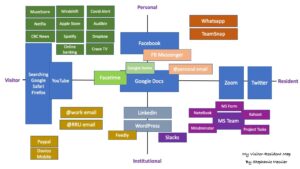
This visitor-resident map represents my use of technology as of day-to-day tools as well as my preferred virtual social gathering place and contributions, both professionally and personally. I recently organized my mobile accordingly as a result of this exercise – see picture.

My personal technology tools are those I use for fitness, entertainment, reading and personal banking. I recently added MuseScore as an interactive music sheets for piano and ukulele. I used YouTube and search engines both for work and personal functions. My preferred communication when socializing are Whatsapp (friends) and FB Messenger (family). I keep in touch with my family mostly via Facebook and rely on TeamSnap for team sports. Google Home is central to our home with some Smart Home functionalities such as lights, music, garage doors, pictures, weather, news, etc.
Google docs has its dual institutional and personal applications, but it is mostly used for kids’ online school. This is the technology that has the most evolved in my opinion along with MS Team. I primarily used MS Team for work along with its associated applications. Linkedin and Twitter are business-related platforms used to network and post relevant news and articles using our schedule in Hootsuite.
I recently added Slacks and Feedly on my mobile and desktop for constant communications and as many of you do, I am currently learning WordPress.

April 22, 2021 at 6:20 pm
Thanks for such a comprehensive graphic! I also use Google for mostly school-related things. I think it’s interesting how Google Classroom-related apps (for teachers, students, and parents) have captured that aspect of learning so thoroughly. I also noticed the same as you – Microsoft seems to be more the domain of work and not so much for personal applications.
I find it interesting that you’ve put Dropbox in personal and as Visitor, but you’ve noted Google Docs in that centre area encompassing a little bit of all four quadrants. Why do you think this has happened, when they’re both file sharing platforms?
April 23, 2021 at 9:21 am
Hi Corie, thanks for your comments and questions! I only use Dropbox for personal use and as a tool for uploading & downloading pictures. My sister-in-law is a photographer and that is her platform of choice for sending us pictures. As for Google Docs, it is used mainly for schooling, both mine and the kids. I use it as a visitor when teachers instruct parents to sign forms, view tests, and access assignments. I also used it as a creative tool for school projects with the kids. So, a little bit of both. Honestly, and similar to you, I’m more of a Microsoft user; however, Google Docs is the tool of choice for the French School Board.
April 25, 2021 at 3:14 pm
Stephanie,
I found your map to be so interesting and organized! I would agree with Corie’s comment that Google seems to be the go-to space for school-related activities, and Microsoft to be more of an institutional space. As a middle school teacher, Google has been absolutely fantastic for working and collaborating with my students as we learn online. The confidential work that I do with my colleagues, however, has definitely happened within the Microsoft realm. It is interesting that this seems to be a common experience for many.
– Amber
April 26, 2021 at 1:55 pm
Thanks for your comment. I need to dig deeper with Google docs to understand it better. That is one of my short-term objective!
April 26, 2021 at 1:51 pm
This is one well-thought-out and organized map, very nice. I find it interesting that I can learn so much about people by reviewing their maps. For instance, you have TeamSnap, which tells me that you are an athlete, a parent and/or a coach.
I really like the idea of organizing your mobile apps to reflect your map. I think I’ll give that a try.
April 26, 2021 at 1:53 pm
You are correct! I use TeamSnap for my kids’ competitive sports, although, TS has been quiet this year with the pandemic. Otherwise, it’s been a saviour! Thanks for your comment!