
The Community of Inquiry (CoI) model is built upon three pillars that support the educational experience.
The first pillar is the Teaching Presence which is “defined as the design, facilitation, and direction of cognitive and social processes for the purpose of realizing personally meaningful and educational worthwhile learning outcomes.” (Anderson, T., Rourke, L., Garrison, D. R., Archer, W. (2001). Assessing Teaching Presence in a Computer Conference Environment. Journal of asynchronous learning networks, 5(2), 1-17.). This means that there is a focus on ensuring the learner is maintaining the active community of learners through learning activities and interaction.
The next pillar is the Social Presence which is “the ability of learners to project their personal characteristics into the community of inquiry, thereby presenting themselves as ‘real people.’” (Rourke, L., Anderson, T. Garrison, D. R., & Archer, W. (2001). Assessing social presence in asynchronous, text-based computer conferencing. Journal of Distance Education, 14(3), 51-70.) This is an area where online learning and the tools it includes can really be used to enhance the learning experience and give more opportunities for learners to express themselves.
The final pillar is the Cognitive presence which is “the extent to which the participants in any particular configuration of a community of inquiry are able to construct meaning through sustained communication.” (Garrison, D. R., Anderson, T., & Archer, W. (2001). Critical Thinking, Cognitive Presence, and Computer Conferencing in Distance Education. American Journal of Distance Education). In this pillar, there is a focus on evaluating the quality of discourse within and course and to attempt to make tools or elements that can help to give a more conclusive conclusion on the quality. This lends itself well to assessment and looking at potentially using available technology and understanding how there can be a more authentic assessment created.
This infographic is done from a post-secondary context when looking at teaching courses to more mature online learners. There is an assumption with much of these strategies in the infographic are assuming a median level of technological literacy.
You will notice that a common thread that runs among these presences with online learning is communication. Every tip involves using a method to encourage and increase communication, this can be by using tools, thinking about the overall course or planning ahead. That’s the goal of this infographic is to share tips to ensure that communication is solid. A final tip that fits into all of these is to have fun. The content may be serious but it doesn’t mean you always have to be.
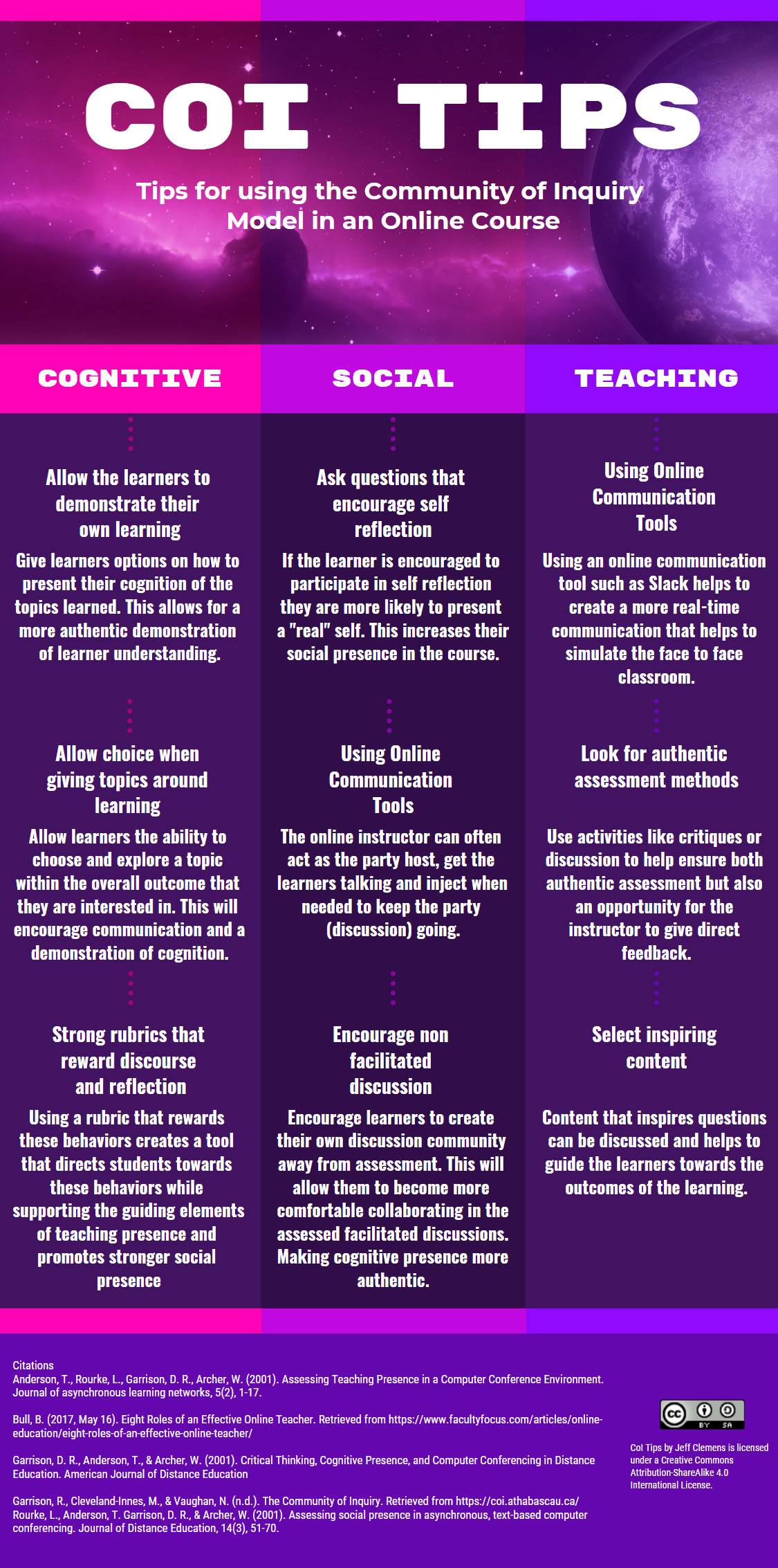
Infographic can also be found at: https://infograph.venngage.com/ps/gH5ceuOLOsI/coi-tips

September 17, 2019 at 6:29 pm
Hello Jeff – Thank you for publishing and even sharing (CC) your tips for post-secondary context for more mature learners. We already established that we have quite a few similarities in our context: web development, currently developing/teaching a fast-track program, more mature learners with a medium level of digital literacy.
You listed communication as the overarching theme for the three presences. I agree communication is oxygen. I also second your sentiment on having fun while learning serious topics. You provided several guides/examples in the infographic, but I appreciated the most where you mentioned: “encourage learners to create their own discussion community away from assessment…”. This is how we MALAT students created our own Slack space to discuss, learn, share, help and occasionally vent … This is what I encourage for my students to have their own space without me (in addition to the shared one), where they can freely communicate and help each other. At the end of the course/project, they always reflect on that experience, and they see its value.
September 18, 2019 at 12:31 pm
Hi Jeff, I too really like that you included the formation of an outside space in your infographic. As you have seen from some of my blog posts and tweets this is something new for me to consider when teaching online.
What makes me wonder in your work is some of the potential crossover of suggestions that could fit into multiple presence columns. You have one that you have included in multiple columns, but with different descriptions. Are there others that you think could fit in multiple columns?
February 16, 2021 at 3:35 am
Hello Jeff,
Would you be able to provide a PDF version of the CoI Tips infographic? I have a Venngage account, but it doesn’t seem to all me to add to my designs.
Thanks so much!
Theresa